Handling dates in Swift seems easy… until it isn’t. Whether it’s a daylight saving bug sneaking into production or a tricky interview…
🎸 Mastering Swift Calendars ⏰
Handling dates in Swift seems easy… until it isn’t. Whether it’s a daylight saving bug sneaking into production or a tricky interview question on Calendar.Identifier, it’s clear — dates are trickier than they look.
So why not learn it properly… using Metallica’s 2025 tour dates?
We’ll cover:
- Every calendar type & locale quirk.
- DateFormatter magic.
- Performance tips.
- Tricky interview questions.
- And yeah, a live countdown view & Metallica-themed SwiftUI fun.
🎸 2025 Metallica Tour: Our Dataset
First, let’s set up the dataset we’ll be working with — a list of Metallica’s upcoming shows, including single-night and two-night events:
struct TourDate: Identifiable {
    let id = UUID()
    let city: String
    let venue: String
    let date: Date
    let isTwoDayEvent: Bool
}
Full dataset, including two-night and one-night shows flagged with a Bool.
let tourDates: [TourDate] = [
    TourDate(city: "Syracuse, NY", venue: "JMA Wireless Dome", date: DateComponents(calendar:  Calendar(identifier: .gregorian), year: 2025, month: 4, day: 19).date!, isTwoDayEvent: false),
    TourDate(city: "Toronto, ON", venue: "Rogers Centre", date: DateComponents(calendar:  Calendar(identifier: .gregorian), year: 2025, month: 4, day: 24).date!, isTwoDayEvent: true),
    TourDate(city: "Toronto, ON", venue: "Rogers Centre", date: DateComponents(calendar:  Calendar(identifier: .gregorian), year: 2025, month: 4, day: 26).date!, isTwoDayEvent: true),
    TourDate(city: "Nashville, TN", venue: "Nissian Stadium", date: DateComponents(calendar:  Calendar(identifier: .gregorian), year: 2025, month: 5, day: 1).date!, isTwoDayEvent: true),
    TourDate(city: "Nashville, TN", venue: "Nissian Stadium", date: DateComponents(calendar:  Calendar(identifier: .gregorian), year: 2025, month: 5, day: 3).date!, isTwoDayEvent: true),
    TourDate(city: "Blacksburg, VA", venue: "Lane Stadium", date: DateComponents(calendar:  Calendar(identifier: .gregorian), year: 2025, month: 5, day: 7).date!, isTwoDayEvent: false),
    TourDate(city: "Columbus, OH", venue: "Historic Crew Stadium", date: DateComponents(calendar:  Calendar(identifier: .gregorian), year: 2025, month: 5, day: 9).date!, isTwoDayEvent: true),
    TourDate(city: "Columbus, OH", venue: "Historic Crew Stadium", date: DateComponents(calendar:  Calendar(identifier: .gregorian), year: 2025, month: 5, day: 11).date!, isTwoDayEvent: true),
    TourDate(city: "Philadelphia, PA", venue: "Lincoln Financial Field", date: DateComponents(calendar:  Calendar(identifier: .gregorian), year: 2025, month: 5, day: 23).date!, isTwoDayEvent: true),
    TourDate(city: "Philadelphia, PA", venue: "Lincoln Financial Field", date: DateComponents(calendar:  Calendar(identifier: .gregorian), year: 2025, month: 5, day: 25).date!, isTwoDayEvent: true),
    TourDate(city: "Washington,D.C.", venue: "Northwest Stadium", date: DateComponents(calendar:  Calendar(identifier: .gregorian), year: 2025, month: 5, day: 28).date!, isTwoDayEvent: false),
    TourDate(city: "Charlotte, NC", venue: "Bank of America Stadium", date: DateComponents(calendar:  Calendar(identifier: .gregorian), year: 2025, month: 5, day: 31).date!, isTwoDayEvent: false),
    TourDate(city: "Atlanta, GA", venue: "Mercedes-Benz Stadium", date: DateComponents(calendar:  Calendar(identifier: .gregorian), year: 2025, month: 6, day: 3).date!, isTwoDayEvent: false),
    TourDate(city: "Tampa, FL", venue: "Raymond James Stadium", date: DateComponents(calendar:  Calendar(identifier: .gregorian), year: 2025, month: 6, day: 6).date!, isTwoDayEvent: true),
    TourDate(city: "Tampa, FL", venue: "Raymond James Stadium", date: DateComponents(calendar:  Calendar(identifier: .gregorian), year: 2025, month: 6, day: 8).date!, isTwoDayEvent: true),
    TourDate(city: "Houston, TX", venue: "NRG Stadium", date: DateComponents(calendar:  Calendar(identifier: .gregorian), year: 2025, month: 6, day: 14).date!, isTwoDayEvent: false),
    TourDate(city: "Santa Clara, CA", venue: "Levi's Stadium", date: DateComponents(calendar:  Calendar(identifier: .gregorian), year: 2025, month: 6, day: 20).date!, isTwoDayEvent: true),
    TourDate(city: "Santa Clara, CA", venue: "Levi's Stadium", date: DateComponents(calendar:  Calendar(identifier: .gregorian), year: 2025, month: 6, day: 22).date!, isTwoDayEvent: true),
    TourDate(city: "Denver, CO", venue: "Empower Field at Mile High", date: DateComponents(calendar:  Calendar(identifier: .gregorian), year: 2025, month: 6, day: 27).date!, isTwoDayEvent: true),
    TourDate(city: "Denver, CO", venue: "Empower Field at Mile High", date: DateComponents(calendar:  Calendar(identifier: .gregorian), year: 2025, month: 6, day: 29).date!, isTwoDayEvent: true),
]
This dataset becomes our playground for everything related to calendars, locales, and date quirks.
🗓️ Grouping Concerts by Month
We’ll create a list grouped by month/year, showing all the shows cleanly organized. Here’s how:
struct MonthSection: Identifiable {
    let id: String
    let title: String
    let dates: [TourDate]
}

func groupTourDatesByMonth(dates: [TourDate]) -> [MonthSection] {
    let grouped = Dictionary(grouping: dates) { tour in
        let comps = Calendar(identifier: .gregorian).dateComponents([.year, .month], from: tour.date)
        return "\(comps.year!)-\(comps.month!)"
    }

    let monthFormatter: DateFormatter = {
        let formatter = DateFormatter()
        formatter.dateFormat = "MMMM yyyy"
        formatter.calendar = Calendar(identifier: .gregorian)
        return formatter
    }()

    return grouped.map { key, datesInMonth in
        let parts = key.split(separator: "-").map(String.init)
        let year = Int(parts[0])!
        let month = Int(parts[1])!
        let date = Calendar(identifier: .gregorian).date(from: DateComponents(year: year, month: month, day: 1))!
        let title = monthFormatter.string(from: date)

        return MonthSection(id: key, title: title, dates: datesInMonth.sorted { $0.date < $1.date })
    }.sorted { $0.id < $1.id }
}
Simple, clean grouping using .gregorian calendar for internal consistency.
🕒 Countdown View: Days Until the Next Show
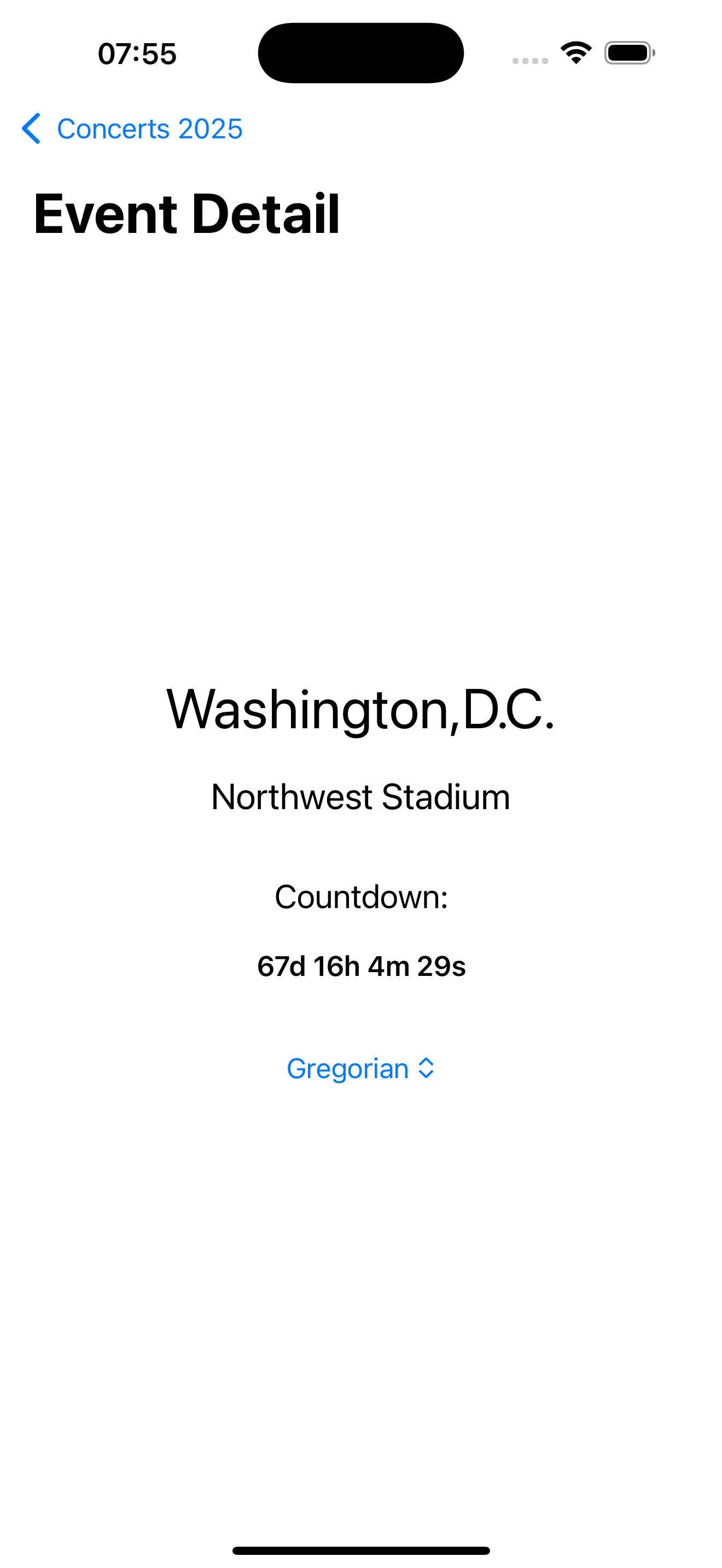
Let’s spice it up with a live countdown view. Users can even toggle between calendar systems.
struct CountdownView: View {
    let tourDate: TourDate
    @State private var now = Date()
    @State private var calendarID: Calendar.Identifier = .gregorian

    let timer = Timer.publish(every: 1, on: .main, in: .common).autoconnect()

    var body: some View {
        let selectedCalendar = Calendar(identifier: calendarID)
        let components = selectedCalendar.dateComponents([.day, .hour, .minute, .second], from: now, to: tourDate.date)

        VStack(spacing: 20) {
            Text(tourDate.city).font(.largeTitle)
            Text(tourDate.venue).font(.title2)

            Text("Countdown:")
            Text("\(components.day ?? 0)d \(components.hour ?? 0)h \(components.minute ?? 0)m \(components.second ?? 0)s")
                .font(.headline)
                .onReceive(timer) { now = $0 }

            Picker("Calendar", selection: $calendarID) {
                ForEach(Calendar.Identifier.allCases, id: \.self) { id in
                    Text("\(id.rawValue)").tag(id)
                }
            }
            .pickerStyle(.menu)
        }
        .padding()
    }
}
🌍 Supporting All Calendar Identifiers
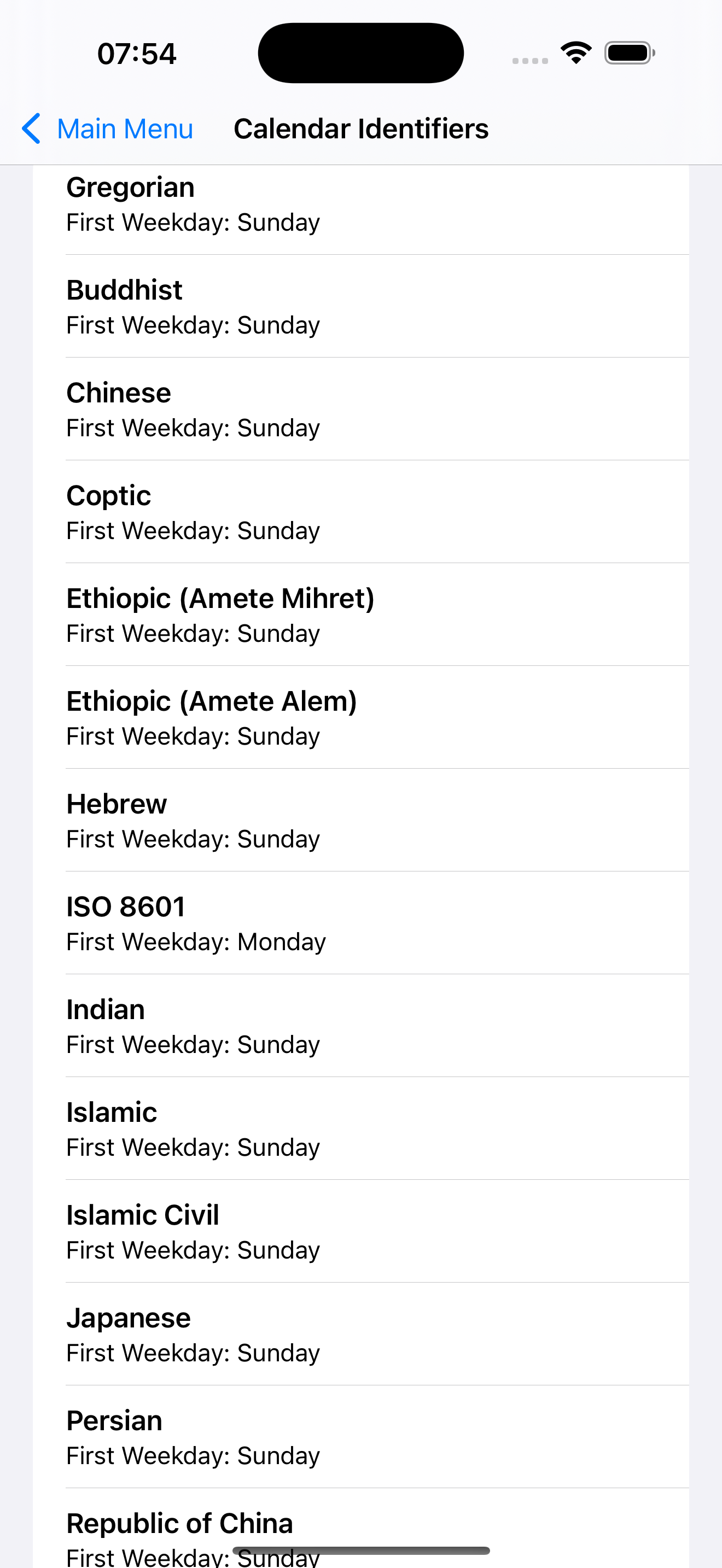
Here’s a snapshot of Swift’s supported calendars:
.buddhist — Year offset (+543)
.japanese — Imperial eras, year resets with emperors
.chinese — Lunisolar, months/days don’t align with Gregorian
.hebrew — Leap months, unique year length
.islamic — Lunar, shorter year, no leap day
.persian — Week starts Saturday, used in Iran
.iso8601 — Standard for APIs, always starts week on Monday
Switching calendars mid-app? No problem — the countdown and groupings will adapt their display while the logic behind the scenes stays stable.
🎯 Formatting Dates: Locale & Calendar Magic
Want full control over how dates are displayed?
func formattedDate(for date: Date, calendarID: Calendar.Identifier, localeID: String, format: String) -> String {
    let formatter = DateFormatter()
    formatter.calendar = Calendar(identifier: calendarID)
    formatter.locale = Locale(identifier: localeID)
    formatter.dateFormat = format
    return formatter.string(from: date)
}
Try combining .japanese calendar with “ar_SA” locale and see what happens. Localization & cultural quirks handled like a champ.
🚨 Interview Break: Tricky Calendar Questions
Question: “How does daylight saving time affect date differences in Swift?”
Answer: If you compare two dates spanning a daylight saving time boundary, you might get unexpected results:
let calendar = Calendar(identifier: .gregorian)
let start = Date(timeIntervalSince1970: 1700000000)
let end = Date(timeIntervalSince1970: 1700000000 + 86_400)
let diff = calendar.dateComponents([.hour], from: start, to: end)
print(diff.hour!) // Could be 23 or 25, depending on DST shift
This happens because the hour count changes when clocks spring forward or fall back.
✅ The Correct Way
If you care about logical days, not exact hours, compare .day components instead of .hour:
let dayDiff = calendar.dateComponents([.day], from: start, to: end)
print(dayDiff.day!) // Always prints 1
Or, if you want consistency regardless of time zones or DST shifts:
- Set a fixed time zone (like UTC).
- Avoid system defaults that depend on user settings.
var calendar = Calendar(identifier: .gregorian)
calendar.timeZone = TimeZone(abbreviation: "UTC")!

let utcDiff = calendar.dateComponents([.hour], from: start, to: end)
print(utcDiff.hour!) // Always 24 hours difference
🚀 Performance Tips & Final Thoughts
Date handling is one of those things that looks easy until you:
- Group across time zones.
- Deal with non-Gregorian calendars.
- Hit leap years or daylight saving shifts.
Keep it solid by:
- Locking your internal logic to .gregorian.
- Letting users customize display calendars/locales.
- Reusing DateFormatter and Calendar instances.
- Being mindful of time zone differences.
Next time an interviewer asks, “What happens when the calendar system changes mid-app?” — you’ll grin and explain how your Metallica-themed SwiftUI app handles it flawlessly.
If you’re ready to test it, tweak it, and maybe even throw in your own countdown to your favorite concert, give the demo app a spin.
More dev fun, stories, and tips? Head over to wesleymatlock.com/blog and keep building apps that rock. 🤘🗓️✨