Projects
Featured Applications
Building native Apple platform applications that combine beautiful design with powerful functionality. Each project showcases deep expertise in SwiftUI, AppKit, Apple’s ecosystem technologies, and modern platform development practices.

Table Ready Coming Soon
Learn six casino table games — iOS
A trainer that gets you ready to sit down at a real casino table: blackjack, No-Limit Hold’em tournaments, craps, Ultimate Texas Hold’em, baccarat, and Pai Gow Poker. Each game has lessons, drills, a strategy reference, and a coached table against bots — and every chip is play money, with nothing to buy, cash out, or win.
The rules and strategy live in a local Swift package, CasinoCore: a shared CardKit and six pure-Swift game engines with no UI dependencies, each with its own test target. The engine always decides the correct play; Apple’s Foundation Models only explains it, on device, with follow-up questions — and devices without Apple Intelligence get notes built from the same engine facts, so every decision still gets an explanation.
Technologies: SwiftUI, SwiftData, CloudKit, Foundation Models, Swift Charts, Swift 6, Swift Testing, iOS 26+
Highlights:
- Six games, six engines —
BlackjackEngine,PokerEngine,CrapsEngine,UltimateHoldemEngine,BaccaratEngine, andPaiGowEngineon a sharedCardKit, covered by Swift Testing suites - Coached tables with three modes — Strict blocks a wrong move, Flag lets it through and explains it, Silent saves everything for the session summary
- On-device coach on Foundation Models that explains the engine’s play rather than choosing it, with a template fallback when the model is unavailable
- A nine-handed No-Limit Hold’em tournament against eight bots, graded pre- and post-flop and saved as you go
- Hi-Lo card counting drills, payout and commission quizzes, and 54 lessons on procedure, etiquette, and tipping
- Progress, weak spots, and daily streaks synced through SwiftData and the user’s private CloudKit database — no accounts
- Localized in English and Spanish, with three table themes
Learn more about Table Ready • Privacy Policy • Support

VinylCrate
The essential companion for vinyl enthusiasts
A comprehensive vinyl record collection management app that helps collectors catalog, organize, and discover their music. Features barcode scanning for quick additions, Discogs integration for rich metadata, customizable crates for organization, and Apple Music integration for instant playback.
Screenshots
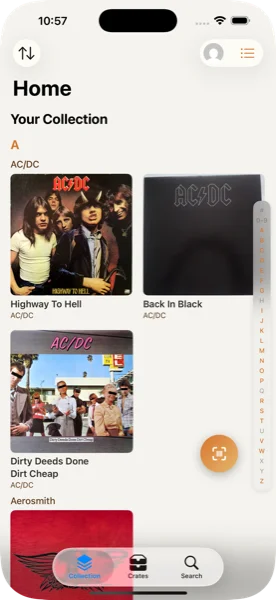
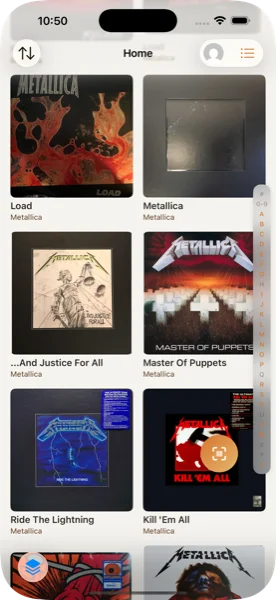
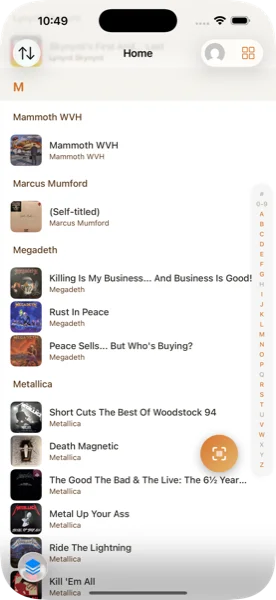
Technologies: SwiftUI, SwiftData, Swift 6, Foundation Models, WidgetKit, CarPlay, Discogs API, Apple Music, VisionKit (Barcode Scanning)
Highlights:
- Listening history logged on device — powering a “Most Spun This Month” card and a “Rediscover” crate of records untouched for a year
- AI crate builder on Apple’s Foundation Models — describe a vibe, get a crate assembled from records you already own, previewed before saving
- Barcode scanning for instant album lookup, with an owned-pressing check so you don’t buy the same record twice
- Full Discogs integration with OAuth authentication
- Apple Music playback through a Technics SL-1200-inspired turntable — play a single record or a whole crate back to back
- CarPlay support and a “Spin This Today” Home Screen widget
- Collection insights: value over time with a 30-day trend, rarity tiers, genre and decade breakdowns, and a shareable stats card via
ImageRenderer - Privacy-focused — collection and listening history stay local, and the AI runs on device
- Offline-first architecture with optional cloud sync
The app emphasizes a beautiful, intuitive interface that makes managing a vinyl collection a joy. Advanced SwiftData integration ensures smooth performance even with large collections.

PushTo100
Transform your fitness with intelligent pushup tracking across iPhone, iPad, and Apple Watch
A comprehensive fitness application that helps users build strength and reach their pushup goals through intelligent tracking, adaptive algorithms, and beautiful visualizations. Currently available on the App Store with thousands of active users transforming their fitness journey.
Screenshots


iPad Experience

Apple Watch Companion


Technologies: SwiftUI, Swift 6, Foundation Models, HealthKit, CloudKit, WidgetKit, WatchKit
Highlights:
- Independent Apple Watch app with Digital Crown control and haptic feedback
- Adaptive coaching built on Apple’s Foundation Models — insights, recommendations, and motivation generated entirely on device, with
@Generableoutput types behind a protocol seam for testability - Lossless offline watch-to-phone hand-off — sets logged with no phone nearby queue and sync when the two reconnect
- Home Screen and Lock Screen widgets, plus Live Activities
- CloudKit sync maintaining data consistency across all devices
- Localized in English, German, Spanish, French, and Italian
- Full accessibility support including VoiceOver and Dynamic Type
- Built with Swift 6 for modern concurrency and rock-solid performance
The app features a privacy-first architecture with all data processing happening on-device and optional encrypted iCloud sync. Live Activities and Home Screen widgets provide at-a-glance progress tracking, while the achievement system keeps users motivated with meaningful milestones.

Visit PushTo100.com • Download on App Store

Workout Wanderer
You already recorded it. See what it means.
Not another tracker. Workout Wanderer reads the workouts already in HealthKit — recorded by Apple Workout, Strava, Nike Run Club, or anything else that writes there — and turns them into interactive route maps with eight performance heat maps, so you can see where you ran fast, climbed hard, or lost your cadence. Being a reader rather than a recorder is what makes the privacy story structural rather than aspirational: there’s no backend because it doesn’t need one.
Screenshots


Technologies: SwiftUI, MapKit, HealthKit, Swift Charts, App Intents, WidgetKit, Swift 6
Highlights:
- Eight heat-map metrics over the route — heart rate, pace, elevation, cadence, running power, vertical oscillation, grade-adjusted pace, and power/effort
- Workout comparison across metrics, route geometry, and physiology — the same route at a different cost
- Heart rate zone distribution mapped to where on the route each zone happened
- Home Screen widgets and Siri Shortcuts via App Intents
- Charts built on Swift Charts with
AXChartDescriptoraudio graphs for VoiceOver - Export as GPX, CSV, or JSON
- Privacy-first by construction — no backend, no analytics, no third-party SDKs, and no network code at all
- Localized in English and Spanish, with a full Dynamic Type and VoiceOver pass
The interface makes complex fitness data accessible and actionable. Because every byte stays on device and nothing is ever uploaded, the privacy guarantee isn’t a policy promise — it’s a property of the architecture.

Visit WorkoutWanderer.com • Download on App Store

GlassCue
On your screen. Not in the recording. — macOS
A macOS teleprompter built around a single core feature: one AppKit flag, NSWindow.sharingType = .none, tells the window server to leave the window out of the buffers it hands to any screen-capture client. Zoom, Teams, Meet, OBS, QuickTime — they record your screen and the prompter simply isn’t in it. Not an overlay trick, and no ScreenCaptureKit involved; the OS does the excluding. It’s also a toggle, so you can flip it off when you want the prompter captured.
Built with AppKit for the window and SwiftUI for the UI, GlassCue is a lean, keyboard-driven app with no accounts, no cloud, and no telemetry.
Technologies: SwiftUI, AppKit, Swift 6, macOS 15+
Highlights:
- Window excluded from screen capture by macOS via
NSWindow.sharingType = .none— a toggle, defaulting on - Eight script formats: txt, Markdown, PDF, RTF, Word, and Fountain / Final Draft for screenwriters
- Mirror mode (⌘⇧M) for beam-splitter teleprompter rigs
- Bluetooth presenter remote support — Page Up/Down for sections, blank key to play
- Adjustable reading position, plus a focus line to anchor your eye
- Floating glassmorphic HUD — live WPM, progress, and time remaining
- Full keyboard control — play, speed, font, opacity, alignment, focus line
- 3-2-1 countdown before playback; always-on-top and joins all Spaces, so it floats over full-screen calls
- Local-only: no network, no accounts, and a privacy manifest declaring no collection and no tracking
@Observable+ AppKit bridge viawithObservationTracking
Learn more about GlassCue • Privacy Policy • Support
Technical Expertise
iOS Development Specializations
Through these projects, I’ve developed deep expertise in:
SwiftUI & Swift 6
- Modern concurrency with async/await and actors
- Complex UI layouts with smooth animations
- Custom view components and modifiers
- Performance optimization for large data sets
Apple Ecosystem Integration
- HealthKit for comprehensive fitness data management
- CloudKit for seamless multi-device synchronization
- MapKit for advanced mapping and route visualization
- WidgetKit for Home Screen and Lock Screen widgets
- WatchKit for independent Apple Watch applications
Data & Performance
- Core Data for efficient local storage
- Real-time data processing and visualization
- Battery optimization for background location tracking
- Memory management for smooth 60fps performance
User Experience
- Accessibility-first development approach
- Adaptive interfaces for all device sizes
- Haptic feedback and motion design
- Privacy-focused architecture

CRX Coming Soon
Medication management, made calm — iOS
A medication manager built for the people who actually need one: elderly users, chronic-condition patients, and the family members who help them. CRX tracks medications and doses, reminds without nagging, and — when the patient chooses — shares safely with a caregiver under explicit, revocable, tiered permissions. Drug-interaction checks run through Claude with an on-device Apple Intelligence fallback, and the AI key never ships in the binary; calls go through an authenticated Supabase Edge Function.
Built iOS 26-first in Swift 6 strict concurrency: SwiftData with a Supabase sync engine and field-aware conflict resolution, interactive widgets and a Dose Timer Live Activity with one-tap logging, App Intents surfaced to Siri and Spotlight, and prescription-label OCR via Vision. Localized in seven languages with a full VoiceOver and Dynamic Type pass — accessibility is the product here, not a checkbox.
Technologies: SwiftUI, SwiftData, Swift 6, WidgetKit, ActivityKit, App Intents, HealthKit, Foundation Models, Supabase, StoreKit 2
Highlights:
- Dose tracking with smart reminders, refill projections from days-supply, and a Today view built around one canonical, fully accessible dose card
- Caregiver sharing (CRX Plus) — three permission tiers, Supabase Realtime alerts, audit logging, and consent the patient can revoke at any time
- AI drug-safety checks — cloud Claude via an authenticated edge-function proxy, on-device Foundation Models fallback, and a “not medical advice” posture throughout
- Prescription-label scanning (Vision OCR) and barcode lookup against the NIH RxNorm database
- Symptom tracking with adherence-correlation insights and audio-graph-enabled Swift Charts
- Interactive widgets and Live Activities — mark a dose taken from the Lock Screen without opening the app
- HealthKit vitals integration, seven languages, and an accessibility-first UI tested at AX5 type sizes
Learn more at crx-med.com • Privacy Policy • Support
Work With Me
I’m passionate about building iOS applications that make a real difference in users’ lives. Currently accepting select projects involving:
- SwiftUI Application Development - Modern iOS apps with beautiful, responsive interfaces
- Fitness & Health Applications - HealthKit integration and workout tracking solutions
- Apple Watch Development - Standalone watchOS apps with premium user experiences
- Location-Based Services - GPS tracking, route visualization, and mapping solutions
- Performance Optimization - Making complex iOS apps fast and responsive
- Technical Consulting - Architecture reviews, code audits, and development strategy
Whether you’re looking to build a new iOS application from scratch or optimize an existing one, I bring technical expertise combined with a focus on user experience and Apple platform best practices.
Get in touch to discuss your next iOS project.