Every app I ship had its own way of getting words and pixels into App Store Connect.
Vinyl Crate had a Python script whose only job was checking field lengths. The rest was a browser, a lot of tabs, and me remembering which locale I’d already pasted. Four apps, four slightly different processes, and the one thing they shared was that I had to relearn each of them every release.
So I built one tool. asc-publish is a Swift package with a command-line front end. It reads a manifest from the app’s repo, looks up the App Store record, and prints a plan of what it would change. It changes nothing until you pass --apply. Table Ready went first: its listing, its screenshots, and the new product page header. Since then Workout Wanderer, GlassCue, and Vinyl Crate have moved onto it too, and the tool itself hasn’t changed once.
fastlane’s deliver has done this job for years, and it does it well. Transporter is for builds, not listings. I built my own for three reasons. I wanted a plan I could read before anything touched the store. I wanted it in Swift, with no Ruby toolchain to keep alive on my Mac. And Apple’s new Asset Library endpoints, the ones behind the product page header, had just shipped, and I wanted to work with them directly.
The Package
There are three targets. AppStorePublisherKit holds everything that matters: auth, the HTTP client, manifest loading, plans, and sync. AscPublishCommands is the swift-argument-parser layer, with five subcommands (status, metadata, screenshots, creative, publish) that share two option groups. And the asc-publish executable is the whole thing below:
import AscPublishCommands

@main
enum Launcher {
    static func main() async {
        await AscPublish.main()
    }
}
The executable stays that thin because of tests. With the commands in a library, a test target imports them like any other module and runs them without spawning a process.
Credentials and the JWT
App Store Connect authenticates with a short-lived JWT that you sign yourself, using a .p8 key from Users and Access. That takes a key ID, an issuer ID, and the key file. ASCCredentials.resolve reads ASC_KEY_ID, ASC_ISSUER_ID, and ASC_P8_PATH into a tuple and matches it with if case let (keyId?, issuerId?, p8Path?). The environment wins only when all three are set. Otherwise the tool falls through to ~/.appstoreconnect/config.json. It never mixes a key ID from the shell with an issuer ID from the file, because mixed credentials fail with a 401 that tells you nothing. The environment, home directory, and file reader are all parameters with production defaults, so tests never touch a real key.
Signing uses CryptoKit and nothing else. There’s no JWT package:
public actor JWTSigner {
    public static let lifetime: TimeInterval = 900
    public static let refreshAfter: TimeInterval = 14 * 60

    private let keyId: String
    private let issuerId: String
    private let key: P256.Signing.PrivateKey
    private let clock: TokenClock
    private var cached: (token: String, issuedAt: Date)?

    public func token() throws -> String {
        let now = clock.now()
        if let cached, now.timeIntervalSince(cached.issuedAt) < Self.refreshAfter, now >= cached.issuedAt {
            return cached.token
        }
        let token = try sign(issuedAt: now)
        cached = (token, now)
        return token
    }

    private func sign(issuedAt: Date) throws -> String {
        let iat = Int(issuedAt.timeIntervalSince1970)
        let encoder = JSONEncoder()
        encoder.outputFormatting = [.sortedKeys, .withoutEscapingSlashes]
        let header = try encoder.encode(Header(kid: keyId))
        let claims = try encoder.encode(Claims(iss: issuerId, iat: iat, exp: iat + Int(Self.lifetime)))
        let signingInput = Self.base64URL(header) + "." + Self.base64URL(claims)
        let signature = try key.signature(for: Data(signingInput.utf8))
        return signingInput + "." + Self.base64URL(signature.rawRepresentation)
    }
}
Header and Claims are two small Encodable structs carrying ES256, the key ID, the issuer, the timestamps, and aud: appstoreconnect-v1. The key itself comes from P256.Signing.PrivateKey(pemRepresentation:), which reads the .p8 contents as they are. You don’t strip headers or parse DER.
signature.rawRepresentation is the one that bites people. ES256 in a JWT expects the raw 64-byte r || s form. CryptoKit also offers derRepresentation, which is a perfectly valid ECDSA signature in a different encoding. Send that and App Store Connect answers with a 401 that looks exactly like a bad key.
The token lasts fifteen minutes, under Apple’s twenty-minute ceiling, and gets re-signed after fourteen. The now >= cached.issuedAt check handles the clock moving backwards. That sounds paranoid, but it costs one comparison. The clock comes in through TokenClock, so a test for the fourteen-minute refresh is a closure returning a later Date, not a test that waits.
JWTSigner is an actor because uploads run four at a time and every API request asks for a token. The actor makes the cache check and the cache write a single step. The client asks on every attempt, not once per request, so a retry that sleeps through a long Retry-After wakes up with a valid token. When auth fails anyway, any 401 comes with a hint to check the key ID, the issuer ID, whether the key was revoked, and the Mac’s clock. The clock is on that list because iat comes from it, and a Mac with the wrong time signs tokens Apple won’t accept.
Manifest, Plan, Apply
Everything specific to an app lives in one file in its repo, appstore-publish.json:
{
  "bundleId": "net.insoc.TableReady",
  "platform": "IOS",
  "version": "1.0",
  "metadata": "build/appstore/metadata",
  "screenshots": {
    "directory": "build/screenshots/final",
    "sets": { "en": ["en-US", "en-GB"], "es": ["es-MX", "es-ES"] },
    "placementGroups": { "1320x2868": "IPHONE_DYNAMIC_ISLAND_LARGE_PROFILE" }
  },
  "creative": {
    "directory": "build/screenshots/creative",
    "sets": { "en": ["en-US", "en-GB"], "es": ["es-MX", "es-ES"] },
    "placements": {
      "PRODUCT_PAGE_HEADER_ASSET": "universal.png",
      "APP_STORE_SEARCH_RESULTS_ASSET": "universal.png"
    }
  }
}
Paths resolve against the manifest’s own directory, so the tool runs from anywhere. metadata, screenshots, and creative are each optional. sets maps one folder to every locale it fills, which is how one set of English screenshots covers both en-US and en-GB. The images in build/screenshots/final come from the localized screenshot harness.
The metadata folder is plain text: one folder per App Store Connect locale, one file per field (name.txt, subtitle.txt, keywords.txt, description.txt, and so on). Plain text is what lets the listing live in Git and get a diff before it ships.
Load everything before you touch the network
PublishRun.run reads every local input before it sends a single request:
let metadata = try wanted.contains(.metadata) ? loadMetadata(options) : nil
let screenshots = try wanted.contains(.screenshots) ? loadScreenshots(options) : nil
let creative = try wanted.contains(.creative) ? loadCreative(options) : nil
Only after all three loads succeed do runMetadata, runScreenshots, and runCreative touch the network. That ordering is on purpose. Every field-length violation in every locale gets reported at once, and so does every image with an alpha channel. If the local side is wrong, you find out in milliseconds, not halfway through a sync with three locales written and five to go.
The plan is a value
The metadata side comes down to one static function, MetadataPlan.make(local:appInfoLocalizations:versionLocalizations:remoteCopyright:localeFilter:). It takes what’s on disk and what’s on App Store Connect, and returns a MetadataPlan. There’s no client, no async, and no side effects. Each locale gets an action, decided here:
public enum Action: Sendable, Equatable {
    case create([MetadataField: String])
    case update([FieldChange])
    case unchanged
    case untouched
}

private static func action(scope: MetadataScope, local: [MetadataField: String], remote: LocalizationRecord?) -> Action {
    let wanted = local.filter { $0.key.scope == scope }
    if wanted.isEmpty {
        return .untouched
    }
    guard let remote else {
        return .create(wanted)
    }
    let changes = MetadataField.allCases.compactMap { field -> FieldChange? in
        guard let new = wanted[field], remote.fields[field] != new else { return nil }
        return FieldChange(field: field, old: remote.fields[field], new: new)
    }
    return changes.isEmpty ? .unchanged : .update(changes)
}
The plan is Sendable and Equatable. A test builds a couple of LocalizationRecord arrays, calls make, and asserts on the result, with no fake server involved.
Each locale actually gets two actions, because App Store Connect splits a listing across two resources. Name, subtitle, and privacy URL belong to the app info localization. Description, keywords, promotional text, What’s New, and the support and marketing URLs belong to the version localization. MetadataField.scope records that split once, so nothing downstream has to think about it.
unchanged and untouched sound like the same thing, but they aren’t. unchanged means local and remote agree. untouched means there’s no local data for that scope at all. That’s how a locale that exists only on App Store Connect gets reported and left alone. The tool never deletes a localization. A field you don’t have a file for stays as it is, too, because it never makes it into wanted.
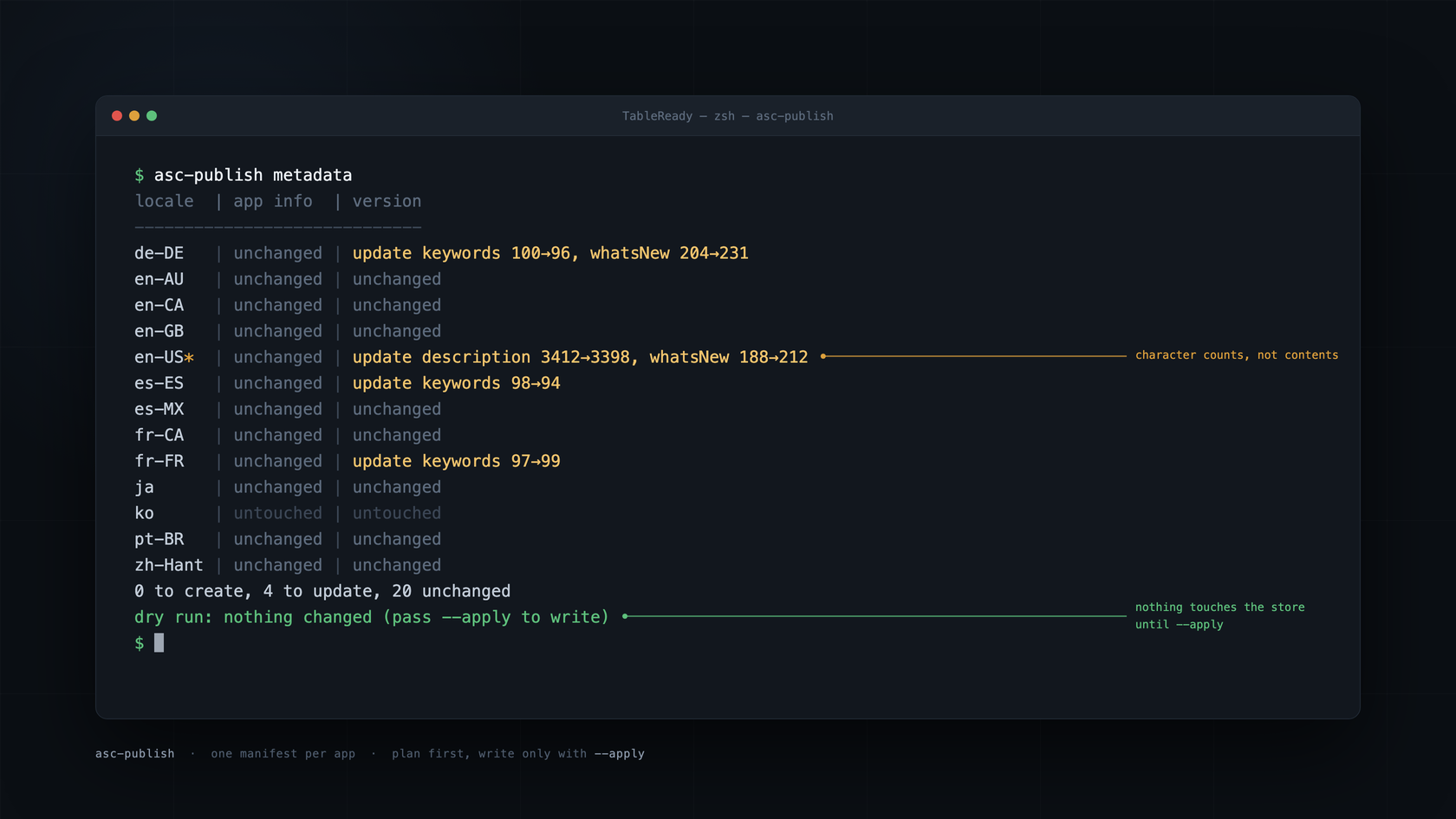
Since the plan is a value, it can print itself. Here’s a dry run:
$ asc-publish metadata
locale | app info  | version
----------------------------
de-DE  | unchanged | update keywords 100→96
en-US* | unchanged | update description 3412→3398, promotionalText 151→162
es-MX  | unchanged | unchanged
fr-FR  | unchanged | update keywords 97→99
ko     | untouched | untouched
0 to create, 3 to update, 5 unchanged
dry run: nothing changed (pass --apply to write)
The table shows character counts, not contents. keywords 100→96 tells me the German keywords changed and got four characters shorter. That’s enough to catch a bad export (a description going from 3,412 characters to 12 isn’t an edit) without dumping four thousand characters of French into the terminal. The * marks the app’s primary locale.
The screenshot and creative sides produce the same kind of value. ScreenshotPlan compares local files against what’s placed on App Store Connect without downloading a single image. Every upload stores the file’s SHA-256 fingerprint as its reference name in the Asset Library. If the fingerprints placed in a group match the local files, in order, the group is unchanged.
The --apply gate
--apply is a flag on the write commands, and it defaults to false. Without it, PublishRun reads the app’s state with readContext, which doesn’t require an editable version. If the version isn’t editable, you get the plan plus a warning that --apply would be refused. With --apply, the lookup requires an editable version and app info, and throws before anything is written.
Then it applies the plan and checks its own work:
try await MetadataSync(client: session.client, log: session.log).apply(
    plan.plan,
    context: context,
    appInfoLocalizations: plan.appInfo,
    versionLocalizations: plan.version
)
let fresh = try await lookup.readContext(manifest: session.manifest, version: options.version)
let replan = try await makeMetadataPlan(local, context: fresh, options: options)
if replan.plan.hasChanges {
    let differing = replan.plan.locales.filter { $0.appInfo.differs || $0.version.differs }.map(\.locale)
    let extra = replan.plan.copyright == nil ? [] : ["copyright"]
    session.log.warn("metadata still differs after apply: " + (differing + extra).joined(separator: ", "))
} else {
    emit("metadata: all locales unchanged after apply")
}
After writing, it reads App Store Connect again and builds a second plan from the fresh state. If that plan has no changes, the run worked. If it has changes, the warning names the locales that still differ. The plan doubles as the verification, so I didn’t have to write a second way to ask “did it work?”
It’s the same instinct behind Four Ways xcodebuild Lied to Me. A success message is a claim, and the tool should check it before passing it along to me.
The Five-Step Upload
The upload said 200 OK. The screenshot wasn’t there yet.
That gap is most of what makes the Asset Library tricky. An image and its spot on the product page are separate resources. The image lives in the app’s asset library. A placement links it to a version localization, a placement type, and a placement group. Getting from a PNG on disk to a screenshot in the listing takes five steps: reserve, upload the parts, commit, wait for processing, and place. Ordering and a read-back come after that.

Reserve, upload, commit
Here’s the middle of AssetUploader.ensureReady, the path a brand-new file takes:
let bytes = try readBytes(of: file)
let reserved = try await client.send(
    .post,
    "/v1/appAssetLibraryImages",
    body: AssetRequests.reserveImage(file, libraryID: libraryID, category: category),
    as: Document<Resource<LibraryImageAttributes>>.self
).data
let operations = reserved.attributes?.uploadOperations ?? []
guard !operations.isEmpty else {
    throw ASCError.invalidUploadOperation("App Store Connect returned no upload operations for \(file.fileName)")
}
try await withThrowingTaskGroup(of: Void.self) { group in
    for operation in operations {
        group.addTask { try await client.upload(operation, bytes: bytes) }
    }
    try await group.waitForAll()
}
_ = try await client.send(
    .patch,
    "/v1/appAssetLibraryImages/\(reserved.id)",
    body: AssetRequests.commitImage(id: reserved.id),
    as: Document<Resource<LibraryImageAttributes>>.self
)
let id = try await waitUntilReady(id: reserved.id, file: file, expectedSpecID: expectedSpecID)
The reservation is a POST to /v1/appAssetLibraryImages that points at the app’s asset library and sends the file name, byte size, asset category, and a reference name. The reference name is the fingerprint from the plan: sha256: plus the hex digest. That one field is what makes re-runs safe. It’s how the planner matches a local file to a library image, and how it tells whether a placed group already matches.
readBytes hashes the file again before any of that. If something rewrote the PNG after the plan was built (like a screenshot script still running in another terminal), the hash won’t match, and the upload stops with screenshotChanged. Bytes that don’t match their own reference name would confuse every plan after them, so this is the one place a second read is worth it.
App Store Connect answers the reservation with uploadOperations. Each one has a method, a URL, an offset, a length, and its own request headers. A file can come back split into several parts. They run at the same time in a throwing task group, and every one goes through ASCClient.upload:
public func upload(_ operation: UploadOperation, bytes: Data) async throws {
    guard let url = URL(string: operation.url) else { throw ASCError.invalidURL(operation.url) }
    guard operation.offset >= 0, operation.length >= 0, operation.offset + operation.length <= bytes.count else {
        throw ASCError.invalidUploadOperation(
            "range \(operation.offset)..<\(operation.offset + operation.length) is outside \(bytes.count) bytes"
        )
    }
    let start = bytes.startIndex + operation.offset
    var request = URLRequest(url: url)
    request.httpMethod = operation.method
    for header in operation.requestHeaders {
        request.setValue(header.value, forHTTPHeaderField: header.name)
    }
    request.httpBody = Data(bytes[start ..< start + operation.length])
    _ = try await perform(request, authorized: false)
}
The range gets bounds-checked before the slice, so a bad offset turns into a readable error instead of a crash. And the request goes out with authorized: false. The operation’s URL and headers are everything that request needs, so the client doesn’t attach the bearer token. A failure on that path comes back as uploadFailed with a short summary of the response, kept separate from the API errors.
Step three is a PATCH on the image with uploaded: true. That’s the commit, and it’s where “200 OK” stops meaning much. Every part can succeed, the commit can succeed, and the image still isn’t something you can place.
Ready isn’t really ready
Step four is a polling loop:
private func waitUntilReady(id: String, file: ScreenshotFile, expectedSpecID: String) async throws -> String {
    var waited = Duration.zero
    while true {
        let image = try await client.get(
            "/v1/appAssetLibraryImages/\(id)",
            as: Document<Resource<LibraryImageAttributes>>.self
        ).data.attributes
        let state = LibraryImage(id: id, state: image?.state ?? "UNKNOWN", specID: image?.specId, category: image?.category)
        // App Store Connect can report the ready state a poll or two before it fills in specId.
        if state.isReady, state.specID != nil {
            try Self.checkSpec(state.specID, of: file, expected: expectedSpecID, required: true)
            return id
        }
        if !state.isReusable, state.state != "AWAITING_UPLOAD" {
            if state.state == "FAILED" {
                try await client.delete("/v1/appAssetLibraryImages/\(id)")
            }
            let details = image?.stateDetails?.summary ?? ""
            throw ASCError.assetFailed(file.fileName, details.isEmpty ? state.state : details)
        }
        guard waited < timeout else { throw ASCError.assetTimeout(file.fileName) }
        try await sleeper.sleep(pollInterval)
        waited += pollInterval
    }
}
LibraryImage sorts states into two buckets. AWAITING_UPLOAD, FAILED, REJECTED, and ARCHIVED aren’t reusable. Ready means reusable and not UPLOAD_COMPLETE, because that state only means the bytes arrived. It doesn’t mean Apple is done with them.
Even ready isn’t enough. The state flips before specId shows up, and if you trust the first ready state, you can’t confirm Apple processed the image as the spec you meant. So the loop polls every two seconds, with a five-minute timeout, until both are present. Then it compares specId with the spec the planner resolved for that pixel size and throws specMismatch if they differ. A FAILED image gets deleted before the error is thrown, and the error carries Apple’s stateDetails flattened to one line, so the error tells you why it failed.
Reuse comes first
A brand-new file is the long way through. The top of ensureReady handles every image the library already has:
if let existing {
    if existing.isReady {
        try Self.checkSpec(existing.specID, of: file, expected: expectedSpecID, required: false)
        return existing.id
    }
    if existing.isReusable {
        return try await waitUntilReady(id: existing.id, file: file, expectedSpecID: expectedSpecID)
    }
    if existing.state == "AWAITING_UPLOAD" {
        try await client.delete("/v1/appAssetLibraryImages/\(existing.id)")
    }
}
existing is the library image with the same fingerprint, if there is one. When the planner reads the library, it keeps the best image for each reference name: ready beats processing, and processing beats unusable. A ready image gets reused as is, with its spec checked if it has one. An image that’s still processing, maybe from a run I stopped a minute ago, gets waited on instead of uploaded twice. An AWAITING_UPLOAD image is an orphan from a run that reserved it and died before the commit. It gets deleted, and the upload starts over. That’s why a re-run after a failure is cheap.
Four at a time
ScreenshotSync feeds the planned assets through ensureReady with a cap:
return try await withThrowingTaskGroup(of: (String, String).self) { group in
    var pending = plan.assets.makeIterator()
    var imageIDs: [String: String] = [:]
    func addNext() -> Bool {
        guard let asset = pending.next() else { return false }
        group.addTask { [uploader] in
            do {
                let id = try await uploader.ensureReady(
                    asset.file,
                    libraryID: libraryID,
                    existing: asset.existing,
                    expectedSpecID: asset.specID,
                    category: asset.category
                )
                return (asset.file.fingerprint, id)
            } catch {
                throw ASCError.step(asset.file.fileName, error)
            }
        }
        return true
    }
    var running = 0
    while running < Self.maxConcurrentUploads, addNext() {
        running += 1
    }
    while let (fingerprint, id) = try await group.next() {
        imageIDs[fingerprint] = id
        _ = addNext()
    }
    return imageIDs
}
maxConcurrentUploads is 4. The first loop starts up to four uploads, and every finished upload adds the next one, so four stay in flight until the iterator runs dry. The plan already deduplicated by fingerprint, so a file used in several locales shows up here once. Each error gets wrapped in ASCError.step with the file name, so the message names the file before it says what went wrong.
This all runs before a single placement changes. If one upload throws, the group cancels the rest and the run stops with nothing placed. Uploads are all or nothing. Placements aren’t.
Place, order, read it back
With every image ready, each group that needs work goes through replace. If the live reference names already equal the desired fingerprints, it logs “already in place” and moves on. Otherwise it deletes the group’s current placements and POSTs one /v1/appAssetLibraryPlacements per file, linking the image to the version localization with a placement type and group. When there’s more than one, it POSTs an /v1/appAssetLibraryPlacementOrderingRequests with the IDs in order.
Then it checks, because order is eventually consistent too. verifiedPlacementCount reads the group back up to five times, two seconds apart, and compares the placed reference names with the fingerprints it wanted. A multi-image group that never matches throws orderMismatch. A single image can’t be out of order, so if it never shows up, that’s placementNotVisible. “Wrong order” and “not there” call for different next steps, so they get different errors.
What the API Does That the Docs Don’t Mention
The App Store Connect API is a big, consistent JSON:API surface. It’s also eventually consistent in ways the reference pages don’t warn you about. The upload is the biggest example. Here are the rest. Nearly every one showed up as a new case in ASCError, with a fix right behind it.
It creates localizations you didn’t ask for
You read the version’s localizations and there’s no es-MX, so you plan a create. You POST it and get a 409 Conflict. Sometimes App Store Connect creates a localization on its own between your read and your write. So the tool treats the conflict as “already there”:
private func createOrAdopt(
    locale: String,
    fields: [MetadataField: String],
    create: () async throws -> String,
    existing: () async throws -> [LocalizationRecord],
    update: (String, [MetadataField: String]) async throws -> Void
) async throws -> LocalizationCreation {
    do {
        return try await LocalizationCreation(id: create(), adopted: false)
    } catch let error as ASCError where error.isConflict {
        guard let record = try await existing().first(where: { $0.locale == locale }) else { throw error }
        let differing = fields.filter { record.fields[$0.key] != $0.value }
        if !differing.isEmpty {
            try await update(record.id, differing)
        }
        return LocalizationCreation(id: record.id, adopted: true)
    }
}
It re-reads the localizations, finds the locale, patches only the fields that differ, and marks the result adopted. If the locale isn’t there after all, the original error goes through untouched. The same writer serves both app info and version localizations, and you’ll see the adopted flag again below.
Connections drop, and some requests can’t be replayed
Long upload runs drop connections. Retrying a GET is free. Retrying the POST that places a screenshot is not, because the first attempt may have landed, and a second one can place the same image twice. The client marks the two placement endpoints from the upload section as single-shot:
let replayable = !(authorized && method == HTTPMethod.post.rawValue && Self.singleShotPaths.contains(path))

private static let singleShotPaths: Set<String> = [
    "/v1/appAssetLibraryPlacements",
    "/v1/appAssetLibraryPlacementOrderingRequests"
]
Transient network errors back off exponentially: one, two, four, eight seconds. A 429 honors Retry-After, capped at sixty seconds. A 5xx only retries when the request is replayable. For the two single-shot endpoints, a network error only retries when it proves the request never left the Mac: not connected, can’t reach the host, DNS failure. A timeout in the middle of a request doesn’t count.
There’s one more case. A DELETE that comes back 404 on a retry counts as success. The first attempt deleted the thing, and the connection dropped before the response got back.
One bad group shouldn’t sink the run
Table Ready’s first real run pushed eighty screenshots across its languages. If a single group fails near the end, the run shouldn’t throw the rest away:
var failed: [String] = []
for group in plan.groups where group.action == .replace {
    let label = group.label
    do {
        guard let localizationID = localizationIDs[group.locale] else {
            throw ASCError.internalInconsistency("no version localization id for \(group.locale)")
        }
        let current = if adopted.contains(group.locale) {
            try await ScreenshotStateReader(client: client)
                .placements(localizationID: localizationID, group: group.group, placementType: group.placementType)
        } else {
            group.current
        }
        try await replace(group, current: current, localizationID: localizationID, imageIDs: imageIDs)
    } catch is CancellationError {
        throw CancellationError()
    } catch {
        failed.append(label)
        log.info("\(label): FAILED — \(error)")
    }
}
if !failed.isEmpty {
    throw plan.category == AssetRequests.screenshotCategory
        ? ASCError.screenshotGroupsFailed(failed)
        : ASCError.creativePlacementsFailed(failed)
}
Each group runs on its own. Failures get collected, everything else goes through, and the error at the end lists exactly what failed. Its message tells you to re-run the same command. That re-plans from what’s live, the groups that succeeded show up as unchanged, the images are already in the library, and only the failed groups get redone. Cancellation is the one exception. It’s rethrown right away, because Ctrl-C should mean stop.
That’s also where adopted comes back. A plan built before App Store Connect auto-created a locale thinks that locale has no placements. So for adopted locales, the sync reads the live placements instead of trusting the plan.
There’s no resume file. Re-running the command reads what’s live and picks up from there.
The spec sheet is an endpoint
This one was a nice surprise. Screenshot sizes, accepted formats, and per-group limits all come from /v1/appAssetLibraryRefData at run time. They’re not tables I copied out of a help page. PlacementResolver maps a file’s pixel size to a placement group from that data. When a size fits more than one group, it refuses to guess and asks for a placementGroups pin in the manifest.
The product page header and search results images go through the same resolver with a different placement type. One universal PNG named for both gets uploaded once and placed twice, because the plan deduplicates by fingerprint:
$ asc-publish creative
locale | placement                      | file          | action
----------------------------------------------------------------
en-US* | APP_STORE_SEARCH_RESULTS_ASSET | universal.png | replace (0 → 1)
en-US* | PRODUCT_PAGE_HEADER_ASSET      | universal.png | replace (0 → 1)
en-GB  | APP_STORE_SEARCH_RESULTS_ASSET | universal.png | replace (0 → 1)
en-GB  | PRODUCT_PAGE_HEADER_ASSET      | universal.png | replace (0 → 1)
es-ES  | APP_STORE_SEARCH_RESULTS_ASSET | universal.png | replace (0 → 1)
es-ES  | PRODUCT_PAGE_HEADER_ASSET      | universal.png | replace (0 → 1)
es-MX  | APP_STORE_SEARCH_RESULTS_ASSET | universal.png | replace (0 → 1)
es-MX  | PRODUCT_PAGE_HEADER_ASSET      | universal.png | replace (0 → 1)
2 files to upload, 0 already in the asset library, 0 localizations to create
dry run: nothing changed (pass --apply to write)
That’s eight placements and two uploads, one English and one Spanish.
Here’s Table Ready’s Japanese one. The same file fills both the header slot and the search results slot.

Three More Apps, Zero Changes
I built the whole tool in a day, and Table Ready’s listing got exported into a metadata folder and published through it right away. Today its manifest maps eight language folders to fourteen locales.
The tool’s repo hasn’t changed since.
Workout Wanderer got a manifest next. Its scripts render the iOS 27 product page header at 3840x1646 and the search results image at 3840x2560, two separate files instead of one universal PNG, and publish those plus its screenshots through asc-publish.
Then came GlassCue, my macOS teleprompter app. It got its 2.0 listing in all eleven store locales, plus the same screenshot and header pipeline. Its manifest says "platform": "MAC_OS", and that’s the only hint the tool gets that it’s not an iPhone app. The tool didn’t know or care. Platform had a macOS case from the start, and Mac screenshot sizes come out of the same reference data as everything else.
Vinyl Crate moved over last, but only partway. Its manifest has a creative block and nothing else: a header.png and a search-results.png per language folder for version 4.2.0. publish skips any block a manifest doesn’t configure, so an app can move one piece at a time.
Bundle IDs, locales, folders, and placement pins all live in the manifest. Sizes and formats come from Apple. The tool doesn’t know the name of a single app it publishes. Here’s the recipe:
- Write
appstore-publish.jsonin the app’s repo. - Export the listing into the folder layout, one folder per locale.
- Run
asc-publish statusto confirm the credentials, the app, and the version state. - Run
asc-publish publishand read the plan. - Run
asc-publish publish --apply, then run it again and expect everything unchanged.
Step five is my favorite. The second --apply should do nothing, and when it does nothing, that’s the proof the first one worked.
The code changes I do expect will come from Apple. iPhone Duo screenshots become required for submissions starting in April 2027, and since the resolver reads Apple’s reference data, in theory those sizes just show up and resolve. I’ll find out when the first Duo screenshot goes through a plan.
Four apps, one manifest each, and one tool that doesn’t care which app it’s running for.