MusicKit is one of those APIs that sounds friendly. Apple Music access. Native Swift. First-class playback. I thought this was going to be a quick late‑night build with a fresh cup of coffee. What could go wrong?
Plenty.
And that’s part of the fun.
This post came out of a side project spiral - the good kind. I wanted to play with Apple Music, build something that felt alive, and scratch a vinyl-nerd itch without dragging UIKit ghosts into SwiftUI. Think album art, queues, scrubbing, shuffle, repeat… all the stuff users expect without thinking about it.
Also: the Simulator will betray you. Repeatedly. We’ll talk about that.
If you’re shipping a side project, polishing a hobby app, or finally wiring Apple Music into something you actually care about, this guide is for intermediate SwiftUI devs and seniors who want to wire up MusicKit without hand-waving. You’ll build a real player, learn where the sharp edges are, and walk away knowing what’s actually happening under the hood.
And yes - there are a few Metallica nods sprinkled in. You’ve been warned. 🤘
(If you’ve ever built UI at 1am while Master of Puppets is looping - or you told yourself you’d stop after this track and then Battery kicked in - you get it.)
What You’ll Build
By the end, you’ll have a working SwiftUI music player that can:
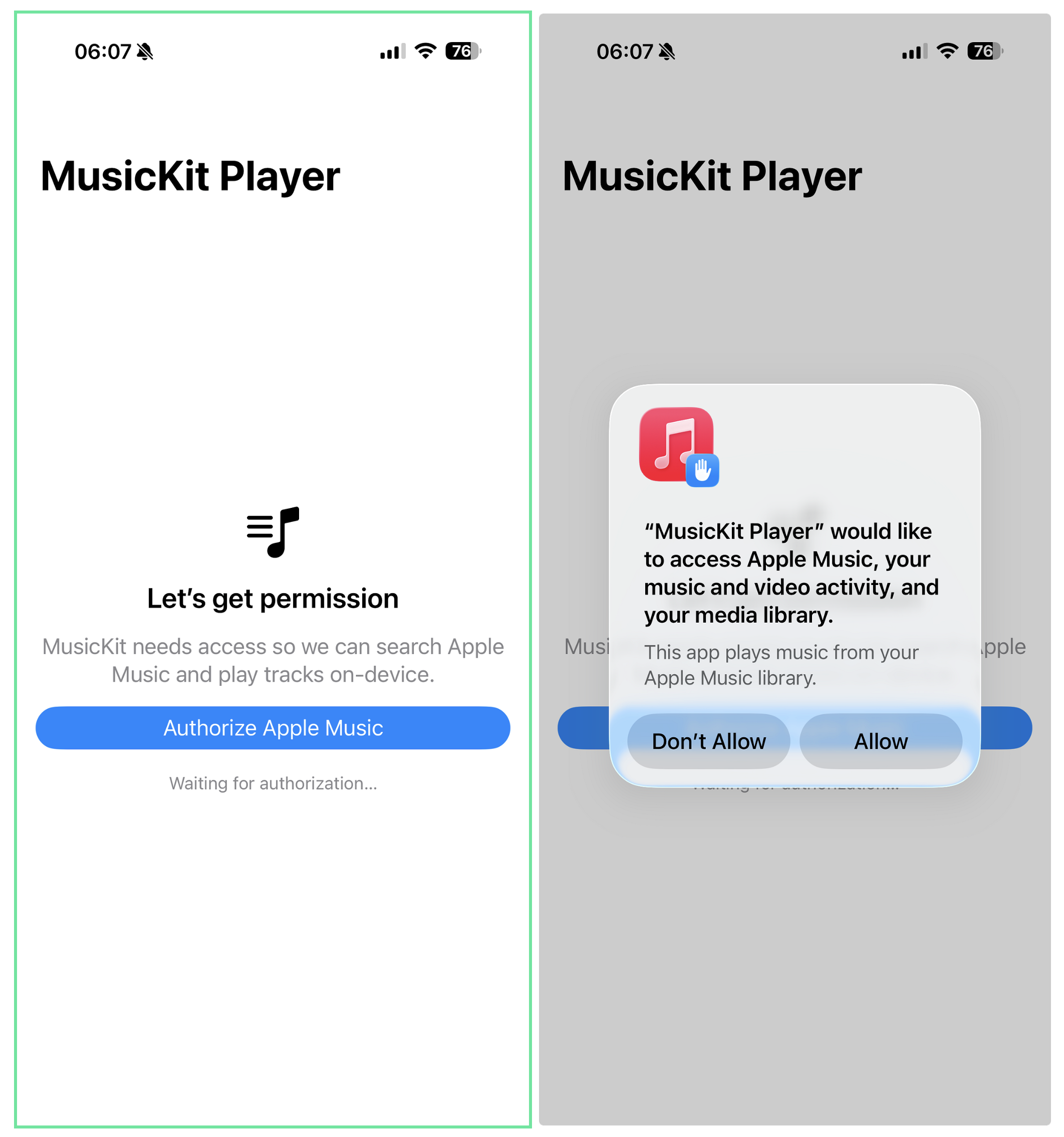
- Ask for Apple Music permission (correctly)
- Search the Apple Music catalog
- Play albums and tracks
- Manage a playback queue
- Track progress and scrubbing
- Toggle shuffle and repeat
- Survive real-device testing (because the Simulator taps out early)
Prereqs (no surprises):
- Apple Developer account
- MusicKit entitlement enabled
- iOS 16+ target (iOS 17+ recommended for @Observable)
- A physical device
(The Simulator does not support MusicKit. It never has. It never will.)
Version notes:
- iOS 15.4+: Basic MusicKit APIs
- iOS 16+: Queue improvements, better subscription handling
- iOS 17+: @Observable macro (used in this guide), cleaner state management
The Code (If You Want to Follow Along)
If you’d rather read this with Xcode open - or you just want to poke around a real MusicKit project - the full sample app lives on GitHub.
It’s the exact code used in this post, including authorization handling, playback state, queue tracking, and the Combine + Timer approach for keeping the UI honest.
👉 GitHub repo: MusicKitDemo
Project Setup (The Boring Part That Still Matters)
Quick confession: I’ve forgotten to add the MusicKit entitlement or the Info.plist usage string more times than I care to admit. The app builds, the UI looks fine… and then nothing plays. Every. Single. Time.
Add the MusicKit Capability
Xcode → Target → Signing & Capabilities → + MusicKit
No capability, no music. Simple as that.
Info.plist
You need a usage string. Apple wants users to know why you’re knocking.
<key>NSAppleMusicUsageDescription</key>
<string>This app plays music from your Apple Music library.</string>
Short. Honest. No marketing fluff.
Subscription Reality Check
Here’s the deal:
- Browsing and searching work without a subscription
- Playback does not
- Always check before you hit play, or you’ll get burned
Apple is polite about failing - but your UX shouldn’t be.
The MusicSubscription object gives you several useful properties:
let subscription = try await MusicSubscription.current

subscription.canPlayCatalogContent  // Apple Music subscribers
subscription.canBecomeSubscriber    // Show upsell UI?
subscription.hasCloudLibraryEnabled // iTunes Match users
Check canPlayCatalogContent before attempting playback. If it’s false, surface a friendly message instead of failing silently.
Authorization (Your First Boss Fight)
This is the part where everything looks fine. The app builds. The UI loads. Buttons tap. And yet… nothing plays. No crash. No warning. Just silence. That’s usually authorization quietly saying “not today.”
MusicKit authorization isn’t hard. It’s just async and stateful enough to trip people up.
import MusicKit

@MainActor
@Observable

final class MusicService {
    var authorizationStatus: MusicAuthorization.Status = .notDetermined
    var hasSubscription = false

    var isAuthorized: Bool {
        authorizationStatus == .authorized
    }

    func requestAuthorization() async {
        let status = await MusicAuthorization.request()
        authorizationStatus = status
        if status == .authorized {
            await checkSubscription()
        }
    }

    func checkSubscription() async {
        do {
            let subscription = try await MusicSubscription.current
            hasSubscription = subscription.canPlayCatalogContent
        } catch {
            hasSubscription = false
        }
    }
}
Two things worth calling out:
- This must run on a real device
- Subscription checks are async and fallible - treat them like network calls
No assumptions. No shortcuts.
Simulator Betrayal (Let’s Address It Now)
You can compile. You can run. You can even navigate your UI.
Then playback silently does nothing.
That’s not your fault. MusicKit simply doesn’t function in the Simulator. If you try to debug this without knowing that, you’ll waste an evening questioning your life choices.
Real device. Every time.
Playback - Where Things Get Real
If you’ve been around long enough to wire up playback with UIKit, AVFoundation, and a stack of notifications flying around, this part will feel refreshingly contained. No manual audio sessions. No delegate soup. No guessing which callback fired last. MusicKit still has opinions - but compared to the old days, this feels like trading a rack of amps and patch cables for a clean, labeled mixer.
At the center of everything is ApplicationMusicPlayer.shared. You don’t subclass it. You don’t replace it. You wrap it and keep your own state.
import Combine

@MainActor
@Observable
final class MusicPlayer {
    var isPlaying = false
    var currentTrackTitle = ""
    var currentArtistName = ""
    var currentArtwork: Artwork?

    var playbackProgress: Double = 0
    var currentTime: TimeInterval = 0
    var totalDuration: TimeInterval = 0

    private var tracks: MusicItemCollection<Track>?
    private var storedTrackTitles: [String] = []
    private var currentIndex = 0
    private var timer: Timer?

    private var queueObserver: AnyCancellable?
}
Why track your own queue?
Because the player won’t do it for you in a SwiftUI-friendly way. If you want skip buttons that behave like users expect, you need ownership.
Playing an Album (The Good Stuff)
import os.log

private let logger = Logger(subsystem: "com.yourapp", category: "MusicPlayer")

func play(album: Album) async {
    do {
        let detailedAlbum = try await album.with([.tracks])
        guard let albumTracks = detailedAlbum.tracks else { return }

        tracks = albumTracks
        currentIndex = 0

        let player = ApplicationMusicPlayer.shared
        player.queue = .init(for: albumTracks)

        try await player.play()
        startProgressTracking()
        logger.info("Now playing: \(album.title)")
    } catch {
        logger.error("Playback failed: \(error.localizedDescription)")
    }
}
This is one of those moments where MusicKit feels really nice. Fetch, queue, play. No ceremony.
Use os.log instead of print() - it shows up in Console.app, survives release builds, and makes debugging on-device a lot less painful.
Progress Tracking (Yes, We’re Using a Timer)
MusicKit doesn’t expose observation hooks for playback progress - so we poll with a Timer. But for track changes, we can do better: the queue is an ObservableObject with a objectWillChange publisher.
func startProgressTracking() {
    timer?.invalidate()
    timer = Timer.scheduledTimer(withTimeInterval: 0.5, repeats: true) { [weak self] _ in
        Task { @MainActor in
            self?.updateState()
        }
    }

    // Observe queue changes for track advancement
    let player = ApplicationMusicPlayer.shared
    queueObserver = player.queue.objectWillChange
        .receive(on: DispatchQueue.main)
        .sink { [weak self] _ in
            Task { @MainActor in
                self?.detectTrackChange()
            }
        }
}

func stopProgressTracking() {
    timer?.invalidate()
    timer = nil
    queueObserver?.cancel()
    queueObserver = nil
}
Is it glamorous? No.
Is it reliable? Absolutely.
Sometimes shipping beats elegance. Call it Kill ‘Em All engineering - raw, loud, and it gets the job done.
Here’s what updateState() actually looks like:
private func updateState() {
    let player = ApplicationMusicPlayer.shared
    currentTime = player.playbackTime
    isPlaying = player.state.playbackStatus == .playing

    if totalDuration > 0 {
        playbackProgress = min(1.0, max(0.0, currentTime / totalDuration))
    }
    detectTrackChange(player: player)
}
Simple. But notice that last line - that’s where the real work happens.
The Silent Track Change Problem
Here’s a gotcha that burned hours of my time: MusicKit doesn’t tell you when tracks auto-advance.
Your UI shows “Track 1” while “Track 3” is playing. The user taps skip - suddenly it jumps to “Track 4” and the titles finally update. Weird. Broken. Not what anyone expects.
The fix: observe the queue’s objectWillChange publisher (set up in startProgressTracking() above). When the queue changes, check if we’re on a new track:
private func detectTrackChange() {
    let player = ApplicationMusicPlayer.shared
    guard let currentEntry = player.queue.currentEntry else { return }

    let nowPlayingTitle = currentEntry.title

    guard nowPlayingTitle != currentTrackTitle else { return }

    logger.info("Track changed: '\(currentTrackTitle)' → '\(nowPlayingTitle)'")

    if let newIndex = storedTrackTitles.firstIndex(of: nowPlayingTitle) {
        currentIndex = newIndex
        updateTrackInfo()
    }
}
The key insight: player.queue.currentEntry.title always reflects what’s actually playing. No need to switch on item types - the title property works for songs, tracks, music videos, everything.
By using Combine instead of polling, track changes are detected immediately when they happen, not on the next 0.5-second tick. The UI stays perfectly in sync.
Skip Controls (What Users Actually Expect)
Transport controls seem simple until you realize MusicKit’s skipToNextEntry() works fine, but your UI needs to stay in sync.
func skipToNext() async {
    let totalTracks = tracks?.count ?? 0
    guard currentIndex < totalTracks - 1 else { return }

    do {
        try await ApplicationMusicPlayer.shared.skipToNextEntry()
        currentIndex += 1
        updateTrackInfo()
        logger.info("Skipped to track \(currentIndex + 1)/\(totalTracks)")
    } catch {
        logger.error("Skip failed: \(error.localizedDescription)")
    }
}

func skipToPrevious() async {
    guard currentIndex > 0 else { return }
    do {
        try await ApplicationMusicPlayer.shared.skipToPreviousEntry()
        currentIndex -= 1
        updateTrackInfo()
    } catch {
        logger.error("Skip back failed: \(error.localizedDescription)")
    }
}

private func updateTrackInfo() {
    guard let track = tracks?[currentIndex] else { return }
    currentTrackTitle = track.title
    currentArtistName = track.artistName
    currentArtwork = track.artwork

    totalDuration = track.duration ?? 0
}
The pattern: trust MusicKit to handle playback, but maintain your own index for UI state. When they drift apart (and they will), your track detection code catches it.
Searching Apple Music
Search is straightforward and fast - as long as you debounce your UI.
func search(query: String) async throws -> [Album] {
    var request = MusicCatalogSearchRequest(
        term: query,
        types: [Album.self]
    )
    request.limit = 20

    let response = try await request.response()
    return Array(response.albums)
}
You’ll get albums, artists, tracks - whatever you ask for. The key is being intentional. Too broad and your UI turns into chaos.
Now Playing UI (Where SwiftUI Shines)
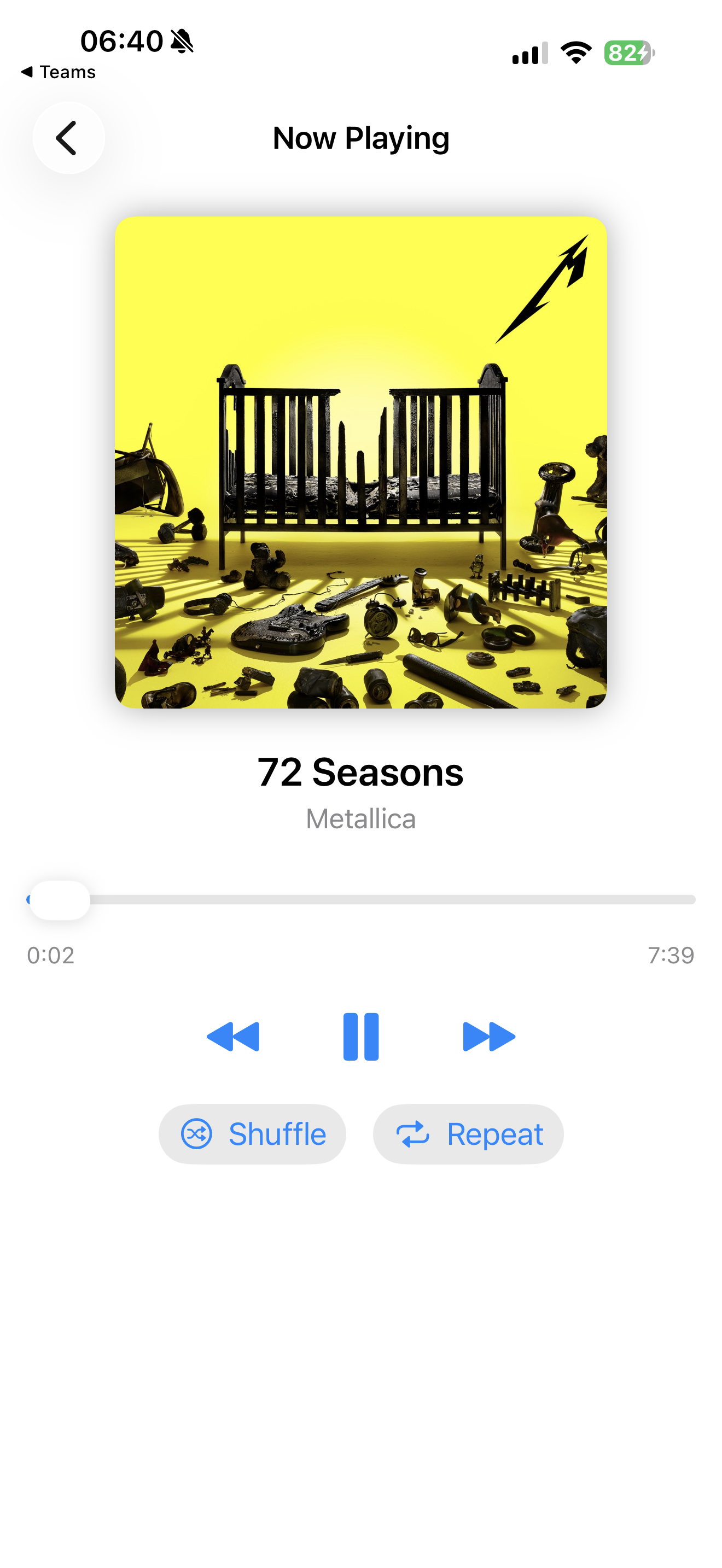
Album art, track info, scrubbing, transport controls - this is SwiftUI’s playground.
struct NowPlayingView: View {
    @Bindable var player: MusicPlayer

    var body: some View {
        VStack(spacing: 24) {
            // Album artwork
            if let artwork = player.currentArtwork {
                ArtworkImage(artwork, width: 300)
                    .clipShape(RoundedRectangle(cornerRadius: 8))
                    .shadow(radius: 10)
            }

            // Track info
            VStack(spacing: 4) {
                Text(player.currentTrackTitle)
                    .font(.title2)
                    .fontWeight(.semibold)
                Text(player.currentArtistName)
                    .font(.subheadline)
                    .foregroundStyle(.secondary)
            }

            // Progress scrubber
            VStack(spacing: 8) {
                Slider(value: $player.playbackProgress) { editing in
                    if !editing {
                        player.seek(to: player.playbackProgress)
                    }
                }
                HStack {
                    Text(formatTime(player.currentTime))
                    Spacer()
                    Text(formatTime(player.totalDuration))
                }
                .font(.caption)
                .foregroundStyle(.secondary)
            }

            // Transport controls
            HStack(spacing: 40) {
                Button { Task { await player.skipToPrevious() } } label: {
                    Image(systemName: "backward.fill")
                        .font(.title)
                }
                Button { player.togglePlayPause() } label: {
                    Image(systemName: player.isPlaying ? "pause.fill" : "play.fill")
                        .font(.largeTitle)
                }
                Button { Task { await player.skipToNext() } } label: {
                    Image(systemName: "forward.fill")
                        .font(.title)
                }
            }
        }
        .padding()
    }
}
Big artwork. Simple hierarchy. No overthinking it.
This is also where your app starts to feel less like a demo and more like a product.
Shuffle & Repeat (Tiny Features, Big Expectations)
Users notice when these don’t behave.
ApplicationMusicPlayer.shared.state.shuffleMode = .songs
ApplicationMusicPlayer.shared.state.repeatMode = .one
Cycle them cleanly. Reflect state visually. No surprises.
Error Handling (Be Kind to the User)
Playback can fail because:
- No authorization
- No subscription
- Network hiccups
Wrap those cases and surface human-readable errors. Apple gives you the signals - you decide how graceful it feels.
Common Gotchas (Learned the Hard Way)
- Simulator won’t play music - test on device, always
- Authorization must happen early - request before the user taps play
- Subscriptions aren’t guaranteed - check
canPlayCatalogContentbefore playback - You must manage your own queue - MusicKit won’t give you a SwiftUI-friendly queue
- Progress tracking needs manual polling - 0.5s Timer is the standard approach
- Track changes are silent - poll
player.queue.currentEntryto catch auto-advances
Miss any of these and your app will feel… off.
What Comes Next
Once you’ve got the basics humming, you can layer on:
- Lock screen metadata - MPNowPlayingInfoCenter handles artwork, title, and playback controls
- Background playback - Configure AVAudioSession for audio to continue when backgrounded
- Widgets - WidgetKit can display now-playing info on the home screen
- CarPlay - Extend your player to in-car displays
- Handoff - Let users continue playback across devices
MusicKit scales nicely once the foundation is solid.
Final Thoughts (Cue the Fade-Out)
It’s usually late when this stuff finally clicks - headphones on, UI half-polished, music looping while you tweak spacing by a point or two and tell yourself one more build. Somewhere between the end of Fade to Black and the start of Orion, it finally feels right. That quiet stretch is where MusicKit started to feel less like an API and more like part of the app.
MusicKit is fun. It’s also opinionated. If you meet it halfway - async-first, state-aware, device-tested - it rewards you with a surprisingly clean API and access to the entire Apple Music catalog.
This project started as a side quest and turned into something I genuinely enjoyed building - the kind where the code fades into the background and the album keeps spinning. If you’re into music, UI polish, and the kind of engineering that feels tactile, this is a great playground.
And if vinyl, album art, and physical media still hit you in the feels - you might want to check out Vinyl Crate, my ongoing love letter to records, artwork, and intentional listening. Digital convenience, analog soul. Somewhere between SwiftUI and Metallica.

Bonus: More Real-World iOS Survival Stories
If you’re hungry for more SwiftUI experiments, war stories, and the occasional side-project spiral, you can find everything I’m writing here:
I’m always building, breaking, and rebuilding - and if you spin up something fun with MusicKit, send it my way. Let’s keep making apps that rock. 🎸