
There’s a moment in every AI feature’s life where someone asks the question that actually matters: “What happens when there’s no internet?”
For VinylCrate — a vinyl record collection app I’ve been building — that question came early. Collectors browse their crates at record stores, at flea markets, on planes. They want album insights, crate summaries, mood tags, and recommendations. They want them fast. And they definitely don’t want their listening habits hitting some third-party server so I can generate a three-sentence blurb about their jazz collection.
Apple’s Foundation Models framework solved all of that. Four distinct AI features — collection summaries, crate insights, album analysis, and personalized recommendations — running entirely on-device. No API keys. No per-token billing. No privacy nutrition label gymnastics. The model ships with the OS. Wherever I may roam — record store, flea market, 35,000 feet — the AI comes with me.
This isn’t a WWDC recap. This is what it actually looks like when you architect a production app around on-device inference. The patterns that worked, the constraints that shaped the design, and the honest trade-offs against cloud models.

Enter Sandman — Checking Availability Before You Dream
The first thing you learn with Foundation Models is that your feature might not exist on the user’s device. Not every iPhone runs Apple Intelligence. Not every user has it enabled. And even when they do, the model might still be downloading.
You check availability before anything else:
func checkAvailability() {
    let model = SystemLanguageModel.default

    switch model.availability {
    case .available:
        availability = .available

    case .unavailable(let reason):
        switch reason {
        case .deviceNotEligible:
            availability = .unavailable(.deviceNotEligible)
        case .appleIntelligenceNotEnabled:
            availability = .unavailable(.appleIntelligenceNotEnabled)
        case .modelNotReady:
            availability = .unavailable(.modelNotReady)
        @unknown default:
            availability = .unavailable(.unknown)
        }

    @unknown default:
        availability = .unknown
    }
}
That @unknown default on both switch levels isn’t paranoia. Apple will add new unavailability reasons — maybe region restrictions, maybe parental controls, maybe something we can’t predict yet. Your app needs to degrade gracefully when it encounters a case you didn’t compile against.
The UX decision matters here. I wrapped Apple’s availability into app-specific enums — AIAvailability and AIUnavailableReason — because the UI needs to show different messages for “your device can’t do this” versus “go enable Apple Intelligence in Settings” versus “hang tight, model’s downloading.” Three completely different user experiences for what looks like one boolean from the outside.
Every generation call in VinylCrate starts with the same guard:
guard isAvailable else {
    return nil
}
No availability, no attempt. Fail silently, show the non-AI fallback. The user never sees a broken loading state.
Master of Puppets — @Generable Pulls the Strings
If you’ve used cloud APIs, you’re used to this dance: send a prompt, get a string back, parse it, hope it’s JSON, handle the cases where it isn’t. Maybe you bolt on function calling. Maybe you write a regex and pray.
@Generable skips all of that. You define a Swift struct, decorate it with constraints, and the model generates an instance of your type directly. No parsing. No string manipulation. Type-safe output from an LLM.
VinylCrate uses three @Generable structs, and each one taught me something different about how to think about structured generation.
The Simple Case: Album Insights
@Generable(description: "AI-generated insights about a vinyl album")
struct AlbumAIInsight: Codable, Sendable, Equatable, Hashable {

    @Guide(description: "2-3 sentences about the musical style, sound characteristics, and what makes this album notable")
    var musicalAnalysis: String

    @Guide(description: "1-2 sentences about rarity, collector demand, and market positioning based on community metrics")
    var collectorInsights: String

    @Guide(description: "1-2 sentences about historical context, artist's era, and cultural significance")
    var historicalContext: String
}
Three String fields. Sentence-count guidance lives in the description. That’s it.
Here’s the thing about @Guide descriptions on strings — they’re soft constraints. The model usually respects “2-3 sentences,” but it’s not enforced the way .range(1...100) is enforced on an Int. Think of string descriptions as strong suggestions. The model treats them like system instructions, not schema validation. When the input data is rich enough to warrant four sentences, sometimes you get four sentences. That’s fine.

The Mixed Case: Crate Insights
@Generable(description: "AI-generated insights about a vinyl crate collection")
struct CrateAIInsight: Codable, Sendable, Equatable {

    @Guide(description: "A conversational 2-3 sentence summary highlighting what makes this crate unique, interesting patterns, and the overall character of the collection")
    var summary: String

    @Guide(description: "A single short sentence (max 10 words) capturing the essence of the crate for card preview")
    var snippet: String

    @Guide(description: "3-5 mood/vibe tags that describe the crate's musical character - use evocative, specific descriptors", .minimumCount(3), .maximumCount(5))
    var moodTags: [String]
}
Now we’re mixing types. summary and snippet are prose with soft constraints. But moodTags uses .minimumCount(3) and .maximumCount(5) — those are hard constraints. The model will always return between three and five tags. That’s the difference between a description (“max 10 words”) and a @Guide parameter (.maximumCount(5)). The description is a suggestion. The parameter is a contract.
This matters for UI. I can confidently lay out a tag row knowing I’ll get 3-5 items. I can’t confidently truncate snippet to 10 words — I might get 12. Design accordingly.

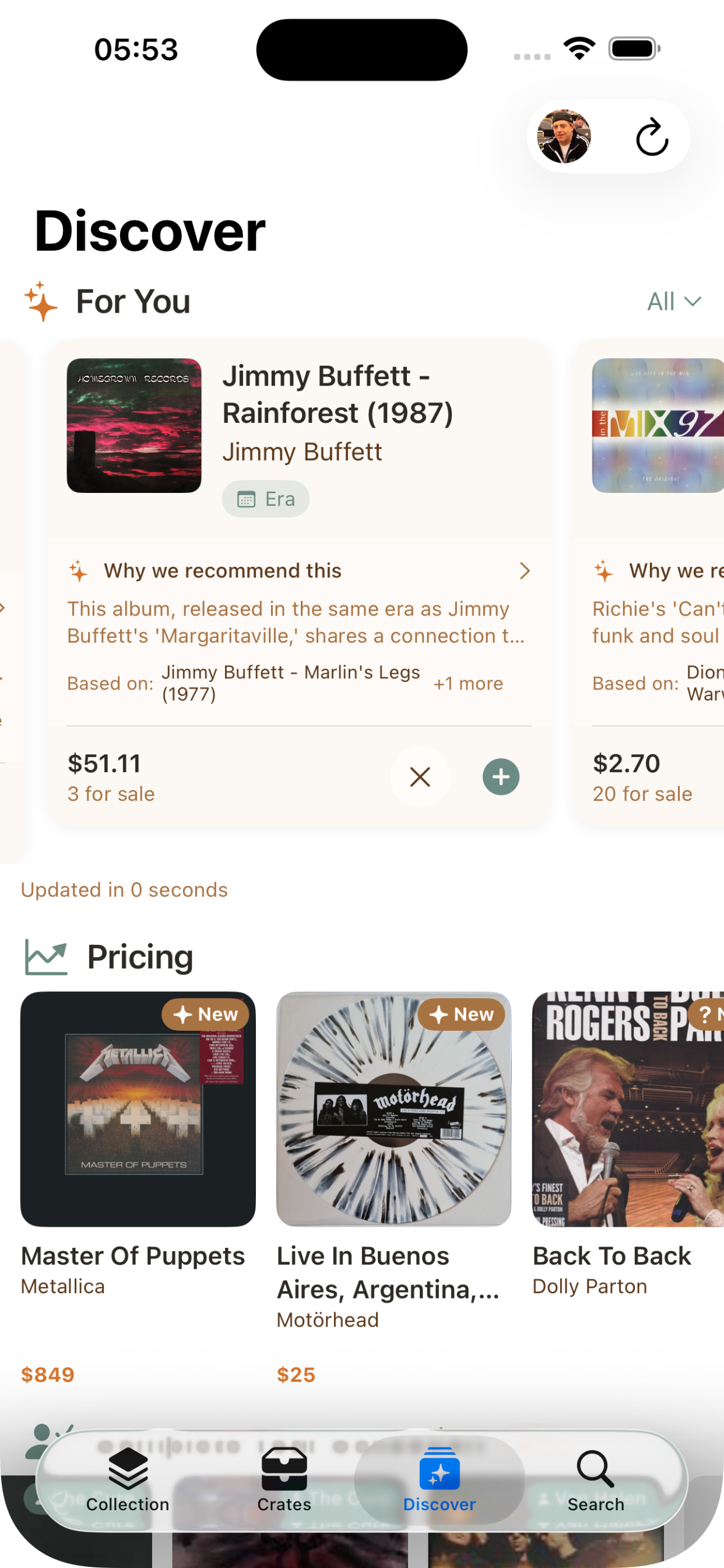
The …And Justice for All Case: Album Recommendations
@Generable(description: "AI-generated album recommendation based on user's vinyl collection")
struct AlbumRecommendation: Codable, Sendable, Equatable, Hashable, Identifiable {

    @Guide(description: "A valid Discogs release ID number for the recommended album")
    var releaseId: Int

    @Guide(description: "The full album title")
    var title: String

    @Guide(description: "The primary artist or band name")
    var artist: String

    @Guide(description: "2-3 sentence explanation of why this album is recommended, citing specific albums from the user's collection that inspired this recommendation")
    var reasoning: String

    @Guide(description: "The primary connection type", .anyOf(["artist", "genre", "era", "label", "style"]))
    var connectionType: String

    @Guide(description: "Names of 1-3 albums from the user's collection that inspired this recommendation", .minimumCount(1), .maximumCount(3))
    var basedOn: [String]

    var id: String { "\(releaseId)" }
}
This one’s doing real work. A few things worth calling out:
.anyOf as a constrained enum. connectionType is a String with .anyOf(["artist", "genre", "era", "label", "style"]). Why not a @Generable enum? Because I wanted the raw string for display and serialization without conversion overhead, and because .anyOf gives me the same constraint guarantee. The model will only output one of those five values. If I needed pattern matching in Swift, I’d use the enum. For display and filtering, the constrained string is simpler.
Array generation. The session call generates [AlbumRecommendation].self — a full array of complex structs in one pass:
let response = try await session.respond(to: prompt, generating: [AlbumRecommendation].self)
let recommendations = response.content
That’s ten structured recommendations with constrained fields, generated on-device, returned as a typed Swift array. No JSON parsing. No error-prone string splitting. The model either gives you valid [AlbumRecommendation] or throws decodingFailure. There’s no in-between where you get half-valid data.
The releaseId caveat. The model generates what it thinks is a valid Discogs release ID. It often isn’t. That’s a known limitation of on-device models — they don’t have access to external databases. VinylCrate treats the AI-generated ID as a hint and does a secondary lookup through the Discogs API to verify and enrich. The AI provides the what; the API provides the verified details. This pattern comes up a lot when you’re working without tool calling.
The Unforgiven (Prompt) — Instructions That Earn Their Tokens
Each AI feature in VinylCrate gets its own LanguageModelSession with tailored instructions. Not one mega-session. Not shared state. A fresh, purpose-built session per generation call. Like tuning for different songs — same guitar, different tone.
let session = LanguageModelSession(instructions: Self.albumInsightsInstructions)
let response = try await session.respond(to: prompt, generating: AlbumAIInsight.self)
The instructions matter more than you’d expect on a smaller model. Here’s what the album insights instructions look like:
private static let albumInsightsInstructions = """
    You are a knowledgeable vinyl record expert, music historian, and collector advisor.
    Provide thoughtful, specific insights about individual albums.
    Write in a warm, conversational tone that demonstrates deep knowledge.
    Focus on what makes this specific release interesting and valuable.
    For musical analysis, describe the sound character, production style, and notable qualities.
    For collector insights, consider the community have/want ratio and market demand.
    For historical context, place the album within the artist's career and musical era.
    Avoid generic statements - be specific to this album.
    """
A few patterns that earned their place across four instruction sets:
Tone direction works. “Warm, conversational tone like a fellow collector” consistently produces better output than no tone guidance. The on-device model responds well to persona framing.
Negative instructions as guardrails. “Don’t use bullet points or lists — write flowing prose.” “Avoid generic statements.” These prevent the model from defaulting to its safest, blandest output. Without them, you get Wikipedia-grade summaries. With them, you get something that sounds like it belongs in the app.
Short is better. The context window is precious. Each instruction set is under 500 characters. I learned this the hard way — my first draft of the recommendations instructions was three paragraphs. The model performed worse with more instructions, not better. Concise direction, rich prompts.
Prompt Engineering for Structured Output
The prompts do the heavy lifting. Here’s how VinylCrate builds an album prompt:
private func buildAlbumPrompt(for album: ReleaseDetail) -> String {
    var parts: [String] = []

    parts.append("Artist: \(album.primaryArtistName)")
    parts.append("Title: \(album.title)")

    if let year = album.year, year > 0 {
        parts.append("Year: \(year)")
    }

    if !album.genres.isEmpty {
        parts.append("Genres: \(album.genres.joined(separator: ", "))")
    }

    if !album.styles.isEmpty {
        parts.append("Styles: \(album.styles.joined(separator: ", "))")
    }

    // Community stats for collector insights
    if let community = album.community {
        parts.append("Community stats: \(community.have) collectors have, \(community.want) want, rated \(String(format: "%.2f", community.rating.average))/5")

        if community.have > 0 {
            let ratio = Double(community.want) / Double(community.have)
            let demandLevel = ratio > 2 ? "high demand" : ratio > 1 ? "moderate demand" : "widely available"
            parts.append("Market demand: \(demandLevel)")
        }
    }

    // Truncate long release notes
    if let notes = album.notes, !notes.isEmpty {
        let truncatedNotes = notes.count > 300 ? String(notes.prefix(300)) + "..." : notes
        parts.append("Release notes: \(truncatedNotes)")
    }

    return """
        Analyze this vinyl album and generate comprehensive insights:

        \(parts.joined(separator: "\n"))
        """
}
Every prompt builder in VinylCrate follows the same discipline: assemble structured context from domain models, cap anything that could blow the context window, and let the @Generable struct define what you want back. The recommendations prompt is the most aggressive — it samples 15 random albums from the collection, includes genre distributions, era breakdowns, and label information, but caps everything. Sample albums get 15. Notes get 300 characters. Exclusion lists get 50 IDs. These aren’t arbitrary numbers. They’re what survived testing against exceededContextWindowSize errors with collections of 200+ records.
Fuel — Caching Strategy (Because On-Device Doesn’t Mean Free)
On-device inference has no API bill, but it has a cost: time and battery. Generating a set of recommendations takes a few seconds. Doing it every time the user opens that tab is wasteful. VinylCrate runs a three-tier caching strategy tuned to how each feature’s data changes.
Collection Summaries — Composition-Based Keys
private func collectionCacheKey(for insights: CollectionInsights) -> String {
    let components = [
        "records:\(insights.totalRecords)",
        "artist:\(insights.topArtist?.name ?? "none")",
        "year:\(insights.topYear?.year ?? 0)",
        "genre:\(insights.topGenre?.genre ?? "none")",
        "rarity:\(insights.rarityTier.rawValue)"
    ]
    return components.joined(separator: "|")
}
The summary doesn’t change unless the collection’s character changes. Adding one more rock album to a 200-record rock-heavy collection doesn’t need a new summary. The cache key captures the shape of the collection, not the exact contents.
Album Insights — TTL Plus Stats Invalidation
private struct CachedAlbumInsight {
    let insight: AlbumAIInsight
    let timestamp: Date
    let communityStatsHash: String

    var isExpired: Bool {
        Date().timeIntervalSince(timestamp) > 7 * 24 * 60 * 60  // 7 days
    }
}
Album insights cache for seven days — but they also invalidate when the Discogs community stats change. If a record’s want/have ratio shifts significantly, the collector insights are stale. The communityStatsHash catches this:
private func communityStatsHash(for album: ReleaseDetail) -> String {
    guard let community = album.community else { return "no-stats" }
    return "\(community.have)-\(community.want)-\(String(format: "%.1f", community.rating.average))"
}
Stale collector insights are worse than no collector insights. If the cache says “widely available” but the record just spiked to high demand, you’ve misled the user. Dual invalidation — time and data — prevents that.
Recommendations — 24-Hour TTL with Collection Hash
Recommendations expire daily and whenever the collection composition changes. The cache key uses a Hasher that combines count, genre filter, and a sample of album IDs:
private func recommendationsCacheKey(for collection: [ReleaseDetail], focusGenre: String? = nil) -> String {
    var hasher = Hasher()
    hasher.combine(collection.count)
    hasher.combine(focusGenre)

    for release in collection.prefix(5) {
        hasher.combine(release.id)
    }
    for release in collection.suffix(5) {
        hasher.combine(release.id)
    }

    let topArtist = Dictionary(grouping: collection) { $0.primaryArtistName }
        .mapValues { $0.count }
        .max { $0.value < $1.value }?
        .key ?? ""
    hasher.combine(topArtist)

    return String(hasher.finalize())
}
Hashing the first five and last five album IDs catches most collection changes without iterating everything. Including the top artist catches the case where someone adds a bunch of records by a new artist — the collection count might only change by a few, but the character shifted.
Damage, Inc. — Every Way Generation Can Fail
On-device doesn’t mean error-free. The GenerationError taxonomy is broad, and I’ve hit most of these in production:
private func handleGenerationError(_ error: LanguageModelSession.GenerationError) {
    switch error {
    case .guardrailViolation:
        lastError = .guardrailViolation
    case .refusal:
        lastError = .refused
    case .rateLimited:
        lastError = .rateLimited
    case .exceededContextWindowSize:
        lastError = .contextTooLarge
    case .assetsUnavailable:
        lastError = .modelUnavailable
    case .unsupportedLanguageOrLocale:
        lastError = .unsupportedLanguage
    case .unsupportedGuide:
        lastError = .generationFailed("Unsupported guide constraint")
    case .decodingFailure:
        lastError = .generationFailed("Failed to decode response")
    case .concurrentRequests:
        lastError = .generationFailed("Please wait for the current request to complete")
    @unknown default:
        lastError = .generationFailed("Unknown error")
    }
}
The ones that surprised me:
guardrailViolation — Music metadata can trigger this. Album titles, release notes, and tracklists from Discogs sometimes contain content that trips the safety filters. It’s rare, but it happens. You can’t catch it upstream because you don’t know what the model considers unsafe until it tells you.
rateLimited — Yes, on-device has rate limits. If a user rapidly navigates between albums, each triggering insight generation, you’ll hit this. The isGenerating flag on AIService prevents concurrent calls from the UI layer, but rapid sequential calls can still trigger it.
exceededContextWindowSize — The one you’ll definitely hit. Large collections with rich metadata blow past the window fast. That Ride the Lightning moment where you realize the solo doesn’t fit the time signature. This is why every prompt builder in VinylCrate has truncation limits. I arrived at those limits through production errors, not theory.
concurrentRequests — The session is single-threaded. One riff at a time. If you somehow fire two respond calls on the same session, you get this. The @MainActor isolation and isGenerating guard prevent it, but it’s worth understanding why the architecture is shaped that way.
Each error maps to a user-facing AIServiceError with LocalizedError conformance. The user sees “Too many requests. Please wait a moment.” — not a stack trace.
The Shortest Straw — Trade-Offs vs. Cloud APIs
I’ve shipped features powered by both on-device models and cloud APIs. The trade-offs are real, and they’re not all in one direction. Drawing the shortest straw isn’t about losing — it’s about knowing which constraints you’re choosing to live with.
Where On-Device Wins
Cost. Zero. Forever. No per-token pricing, no usage tiers, no surprise bills. For an app like VinylCrate where AI features run frequently — every album view, every crate, every recommendation refresh — this is the difference between a sustainable feature and one that eats your margin.
Privacy. Collection data never leaves the device. For a personal collection app, this matters. Users don’t want their record-buying habits processed by a third-party AI provider. With Foundation Models, the data literally cannot leave — there’s no network call to intercept.
Latency for focused tasks. No network round-trip. Album insights generate in 1-2 seconds. A cloud API adds 500ms-2s of network latency on top of inference time, minimum. For a quick insight on an album detail screen, that difference is the difference between “feels instant” and “feels like loading.”
Offline. Full functionality at a record store with bad cell signal. At a flea market. On a plane. The AI features don’t care about connectivity because they never needed it.
App Review simplicity. Apple Intelligence is Apple’s own framework. No third-party SDK privacy disclosures, no explaining why you’re sending user data to an external server.
Where Cloud APIs Win
Raw capability. Claude, GPT-4o, and their peers can handle nuanced multi-step reasoning that the on-device model can’t. If I asked the on-device model to cross-reference a user’s collection against current market trends, analyze pricing patterns, and generate a five-paragraph essay about collecting strategy — it would struggle. A cloud model wouldn’t.
Context window. This is the big one. The on-device window is limited enough that I spend significant architecture effort on truncation and sampling. A cloud model with 128K+ tokens could ingest an entire 500-record collection with full metadata and still have room for detailed instructions. VinylCrate’s recommendation prompt carefully samples 15 albums and caps exclusion lists at 50 IDs. With a cloud model, I’d just send everything.
Knowledge. The on-device model knows what Apple trained it on. It can’t look up whether a specific Discogs release ID is valid. It can’t check current market prices. It can’t tell you that a record was just reissued last month. VinylCrate compensates by treating AI output as a starting point and enriching with API calls to Discogs — but a cloud model with tool use or RAG could do this in a single pass.
Response quality on open-ended generation. For constrained, structured output — the @Generable use case — the on-device model is surprisingly good. But for open-ended prose, cloud models produce more creative, specific, and nuanced text. The collection summaries are the weakest AI feature in VinylCrate, and it’s because unconstrained prose is where the capability gap shows.
Multi-modal and tool use. Cloud models can call functions mid-generation, process images, and chain reasoning steps. Foundation Models is text-in, text-out (or structured-type-out). No mid-generation tool calls. No image analysis. If I wanted the AI to look at an album cover and describe the aesthetic, I’d need a cloud model.
The Constraints You’ll Design Around
A few things that aren’t quite “pros” or “cons” — they’re just the shape of the landscape:
- No function calling. You can’t give the model a tool to call Discogs mid-generation. You build the context up front, generate, then validate and enrich afterward. This shapes your entire architecture.
- Rate limiting exists. Batch carefully. Don’t fire generation on every scroll event.
- Model updates are tied to OS updates. You can’t ship a better model next Tuesday. You get what Apple gives you in each iOS release.
- No fine-tuning without the adapter entitlement. You can tune through instructions and prompt engineering, but not through training. Adapters exist, but they require a special entitlement.
The Hybrid Approach
The honest answer for most apps is: use both. On-device for latency-sensitive, privacy-critical, high-frequency features. Cloud APIs for complex reasoning tasks where capability matters more than speed.
VinylCrate is fully on-device today because the trade-off matrix works: the features are structured-output-heavy, privacy matters, and the context windows are manageable with good prompt engineering. If I added a feature that required deep cross-collection analysis or real-time market intelligence, I’d reach for a cloud API for that specific feature — not replace what’s already working. Sending someone’s record collection to a third-party server? For a vinyl app? That’s not the trade-off I want to make.
Of Wolf and Man — Patterns Worth Stealing
A few architectural decisions that survived production and might save you time:
@MainActor @Observable for the service. AIService is observable so SwiftUI views react to isGenerating, availability, and lastError without manual state management. The @MainActor isolation guarantees UI-safe updates and prevents concurrent session access.
nonisolated init(). ViewModels can create AIService synchronously without an async context. The availability check happens separately. This prevents the cascade of await that makes initialization painful.
Prompt builders as pure functions. Each build*Prompt method takes domain models and returns a string. No side effects, no state mutation. Easy to test, easy to iterate on, easy to swap when you change what the model sees.
Minimum thresholds for graceful degradation. Three albums minimum for recommendations. Two for filtered crate insights. Below the threshold, the feature quietly disappears. No error message, no empty state — just the non-AI version of the screen.
guard collection.count >= 3 else {
    return nil
}
The Outlaw Torn — What’s Next
A few things I’m still working through:
Streaming. Collection summaries would benefit from streamResponse — the user could see the text appear progressively instead of waiting for the full generation. I haven’t wired it up yet because the non-streaming path was simpler to cache, but it’s the obvious next step for perceived performance.
Prewarming. session.prewarm(promptPrefix:) exists and I’m not using it. When a user navigates to an album detail screen, I could prewarm the session with the standard prompt prefix before they tap the “AI Insights” button. That shaves time off the first generation.
Temperature tuning. I’m using default GenerationOptions everywhere. Recommendations could benefit from higher temperature (more creative, more surprising picks) while album insights should probably run lower (more deterministic, more factual). Worth experimenting with.
Adapters. If Apple opens the adapter entitlement more broadly, a vinyl/music-specialized adapter could dramatically improve the quality of genre analysis and historical context. The base model is good. A tuned model could be great.
Fade to Black
The Foundation Models framework isn’t a demo. It’s production infrastructure for a specific class of AI features — structured, private, fast, and offline-capable. The @Generable macro is the real unlock. Not because on-device text generation is better than cloud text generation — it isn’t, for most things. But because type-safe structured output from a local model, with no network dependency and no per-request cost, is a category of capability that didn’t exist before iOS 26.
VinylCrate runs four AI features that touch every screen in the app. They work at record stores with no signal. They cost nothing to operate. And they keep every piece of collection data exactly where it belongs — on the device.
That’s the real trade-off. Not capability versus convenience. Privacy versus power.
For a record collection, nothing else matters.